Usage and bug reports
Screenshots use fictional demo accounts and fixed example metrics, not live systems or qualification evidence.
Choose whether this Rynhult shares a daily usage summary and whether it offers scrubbed bug reports for review. Both choices start off. You must sign in as an owner; members cannot see these controls or the local log.
The one-time Optional usage statistics and bug reports are available invitation lives in Inbox, not a popup or a page-covering banner. Review privacy choices opens these settings. Dismiss notice only clears the invitation; it does not enable either sharing choice.
Release candidate feedback
On a prerelease build (for example 0.15.0-rc.1), these settings also show Report an RC bug on GitHub,
even when an owner has turned telemetry off in Admin features. It opens a
public issue. No repository invitation or telemetry opt-in is needed.
If you share bug reports, you can also review and send the in-app report when one is offered.
If you cannot file an issue, use the support contact next to the link.
Include the build/version, OS and browser, steps, and expected and actual results. Never include secrets,
transcripts or logs containing tokens. Opening the link does not send a report or attach any data.
Stable builds keep their existing reporting flow and do not show this RC link.
Use Discussions for questions and experiences. Report suspected security problems privately using the contact in the security policy, not in a public issue.
Choose what to share
-
Open Settings and choose Usage and bug reports in Settings section.
-
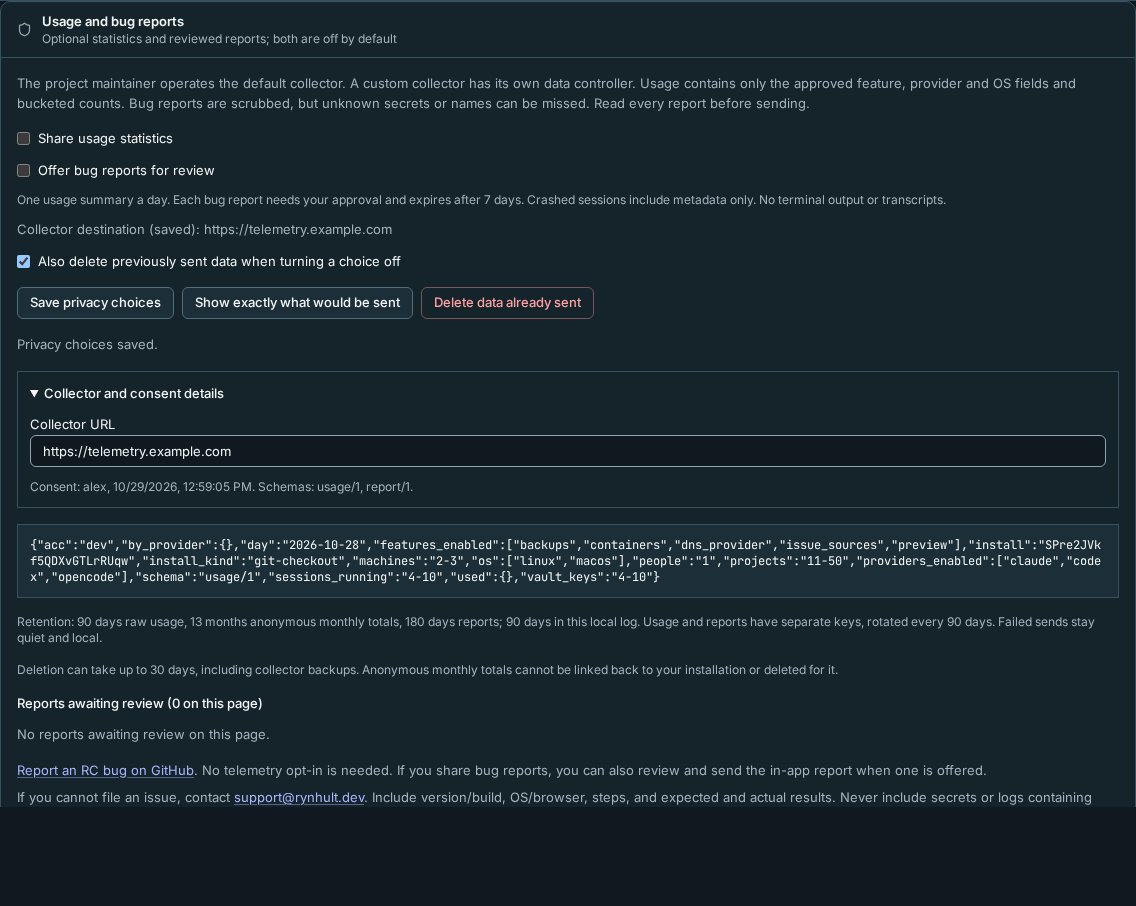
Select Show exactly what would be sent. Previewing is local and sends nothing. The usage JSON contains fixed feature, provider and OS values, rough counts such as
2-3, a UTC day and a rotating installation id. It contains no prompts, transcripts, terminal output, names, paths or repository addresses. -
Optionally select Share usage statistics, Offer bug reports for review, or both. Leaving both unticked keeps collection off. Select Save privacy choices. One usage summary is scheduled per day when enabled.
-
The saved Collector destination stays visible. Open Collector and consent details to edit Collector URL or inspect the consent account, time and schemas. For a company collector, use an HTTPS address such as
https://telemetry.example.com. The project's default collector,https://telemetry.rynhult.dev, runs as a pre-release staging service: anything it receives before version 1 is deleted at launch, and its published retention periods already apply. The project owner is the data controller for the default collector; your own collector has its own controller. A managed address is disabled in the form and says it is controlled by installation configuration.
Consent is recorded with your account, time and schema versions. Collector address changes are audited with their old and new destinations. Managed override changes are recorded as installation-configuration changes when Rynhult observes them, even while sharing is off. Saving choices refreshes an already open payload preview. A schema version change stops that choice until an owner consents again. Usage and reports use different keys, rotated every 90 days; changing collector also gives it new keys. Nodes send nothing directly.
Review a bug report
-
When Rynhult records a qualifying error, an owner Inbox notice links to Review privacy choices in Settings.
-
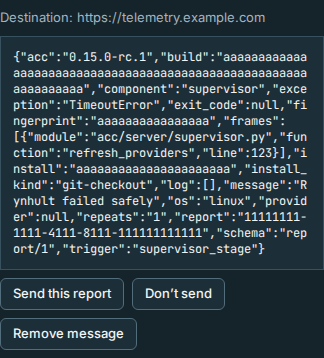
Open that report under Reports awaiting review, above the collapsed history. Read its exact JSON, including the message. Remove message deletes that text while keeping the report pending, so you can review it again.

-
Select Send this report to approve those bytes, or Don’t send to discard it. No report sends itself. Unanswered reports expire after seven days; at most ten different reports are offered per day.
Rynhult reports only its own error metadata, Rynhult stack frames and a scrubbed exception message. Crashed agent sessions contain metadata only. No terminal output, transcripts or agent responses are collected. This version also omits helper tails and log breadcrumbs. Known secrets and identifiers and recognizable sensitive shapes are scrubbed before trimming and again afterwards. URL encodings are normalized; authorization/cookie headers, recognizable credential assignments and textual base64 values are removed. Multiline messages and text containing relative paths are omitted, retaining error metadata, because joining wrapped lines could expose a secret or name. Paths with spaces or unusual home-folder names can cause the rest of the message to be omitted. Scrubbing can miss an unknown name or unusually encoded secret, so review every report. Reports never exceed 16 KiB.
The privacy-review upgrade discards pending, approved and retrying reports made by the older scrubber. Sent history is unchanged. New errors require a new review; old approvals cannot send old text.
Inspect or delete data
- Expand History and delivery status, then a log entry to see its exact payload, result and deletion receipt when applicable. Delivery failures and approved items awaiting delivery are summarized outside the disclosure. Older log entries and Previous log entries appear only when more than one page is needed; they page through all entries, including pending reports on older pages. Successful payloads remain for 90 days after sending. Failures say sending failed, remain local and retry with backoff for up to seven days.
- To stop collection, untick the relevant choice and select Save privacy choices. Pending data for that choice is discarded. Also delete previously sent data when turning a choice off is selected by default.
- You can separately select Delete data already sent, then Request deletion in the confirmation dialog. Rynhult signs deletion requests with every retained key, including keys for previous collector addresses. This explicit deletion action can contact collectors while the sharing choices are off. Check for a receipt in the local log. Deletion cannot finish while a collector is unavailable.
The reference collector keeps raw usage for 90 days, reports for 180 days and anonymous monthly totals for 13 calendar months. Totals drop installation ids and cannot be traced back for deletion. Collector backups must expire within 30 days and preserve deletion when restored. The reference collector redacts secret-like text, addresses, links and paths in a report again before storing it, so it may keep less than the sent copy Rynhult shows in History and delivery status. When its storage is full it refuses new data until the next day, which Rynhult shows as sending failed; deletion still works. Private keys are retained locally for deletion for at most 13 months. No public statistics are available. A self-hosted collector now includes installation and recovery instructions, hourly retention, and a local statistics export that omits figures below ten installations. The default collector’s pre-release notice does not qualify a production deployment. During staging the default collector keeps no backups beyond its virtual machine’s own disk. Usage and report keys stay separate; deletion must cover both streams and every retained rotation. Collector operators must also remove affected backup generations and replay erasures before restoring a snapshot.
Repeated payload previews and report scrubbing release their file and network resources. A long-running Rynhult can keep these optional features enabled without accumulating database handles.
Troubleshooting
- sending failed: the collector is unavailable or refused the request. Rynhult stays quiet and retries locally. Check the address and the collector's status; the default service is a pre-release staging service.
- An HTTP address is rejected: use HTTPS with a valid certificate, without URL credentials, query or fragment. Rynhult refuses redirects and sends no cookies.
- A choice is disabled by policy: the installation administrator has forced it off. Policy cannot opt you in.
- No transmissions in tests: test and CI processes deliberately refuse telemetry sending, including deletion.
On a narrow phone, report actions and log navigation wrap onto additional rows so every control stays reachable.
The local log refreshes automatically. New log entries do not reset unfinished edits to your sharing choices or collector address; select Save privacy choices to apply them.
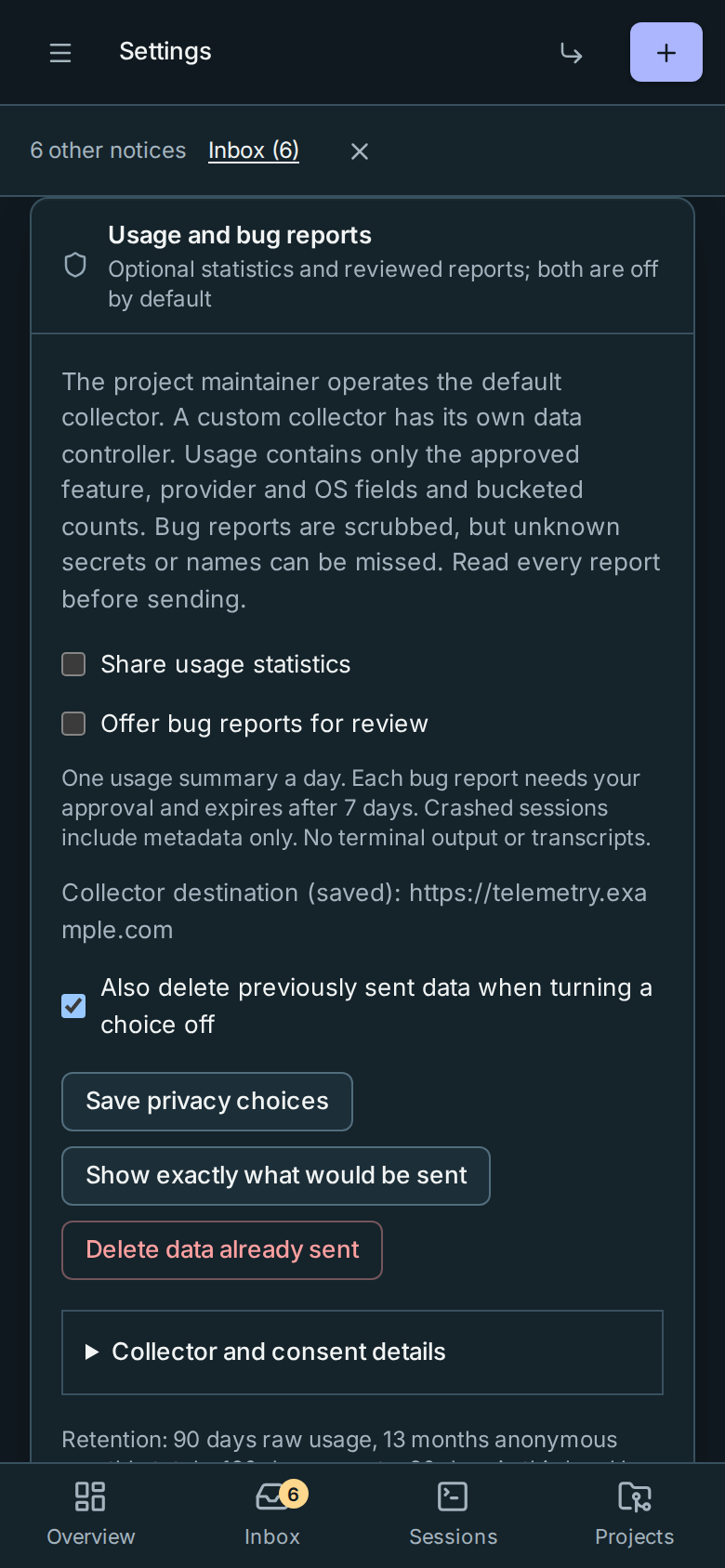
Collector details and history start collapsed. Opening or closing them preserves unfinished privacy choices and collector edits. Consent, destination, scrubbing warnings, exact-payload preview, Save and Delete data already sent remain outside these disclosures. Deletion can take up to 30 days, including collector backups; anonymous monthly totals cannot be deleted for one installation.
This page is generated from docs/wiki/User-Guide/Usage-and-Bug-Reports.md; the same page is under Guide inside Rynhult.