Desktop apps
Screenshots use fictional demo accounts and fixed example metrics, not live systems or qualification evidence.
Outside v1.0. v1 is the self-hosted Linux server used from a browser, including the phone web app, with existing Linux/macOS/Windows-WSL nodes. Native apps follow v1, one platform at a time; the order among native Windows, macOS standalone, Linux desktop, iOS and Android is not chosen yet. Existing desktop source is experimental groundwork, not a v1 deliverable. This supersedes starting native Windows after rc.1; the qualification instructions below are for later native releases. See platform scope.
Status: Linux phase 1 developer slice, not a signed release. The Linux desktop window can now use the local projects, provider login, sessions, terminal, files and history code with a separately provisioned agent account. Windows standalone execution still needs its own account and terminal work. The macOS source port has portable setup tests and requires the MacBook smoke below. The native window identifies Linux or macOS and Standalone mode. The Apple-silicon runtime and app/disk-image build scripts are integrated with this session slice; Mac device qualification and the agent's home-access boundary still need owner review. No native Windows node or standalone execution is available yet. The existing Mac and Windows installers below serve different purposes.
A disposable Debian/systemd test has now checked actual account switching, fake-provider sign-in, terminal streaming, private-file/socket access and reconnection after the owner's PAM login ends. It used no real provider account or physical desktop. Real provider sign-in and graphical logout/accessibility qualification remain separate release checks.
Before you start on Linux
Use an administrator-reviewed installed developer package on a disposable Linux
machine first. The reference setup requires systemd, Git, tmux, ACL tools
(setfacl), Python 3, Node, npm, pkill and crontab already installed.
The cleanup tools come from procps/procps-ng and cron/cronie (Arch: procps-ng
and cronie). Setup checks them before creating an account. The app bundles its own
Python main. No system package is installed by this slice.
Use the installed .deb, RPM or Arch package for execution setup. An AppImage runs from a folder your own account
owns, and setup only trusts resources that root owns and nobody else can change. Setup refuses to run from an
AppImage with "Execution resources must be root-owned". The AppImage is for trying the window, not for running
sessions.
The desktop owner and agent must be different local accounts. Sessions display Not isolated · Separate agent account: they share the agent account’s files and provider credentials. Account separation protects the owner’s private files only where operating-system permissions deny access. This is not a container or a separate sandbox for every session.
Set up execution once
-
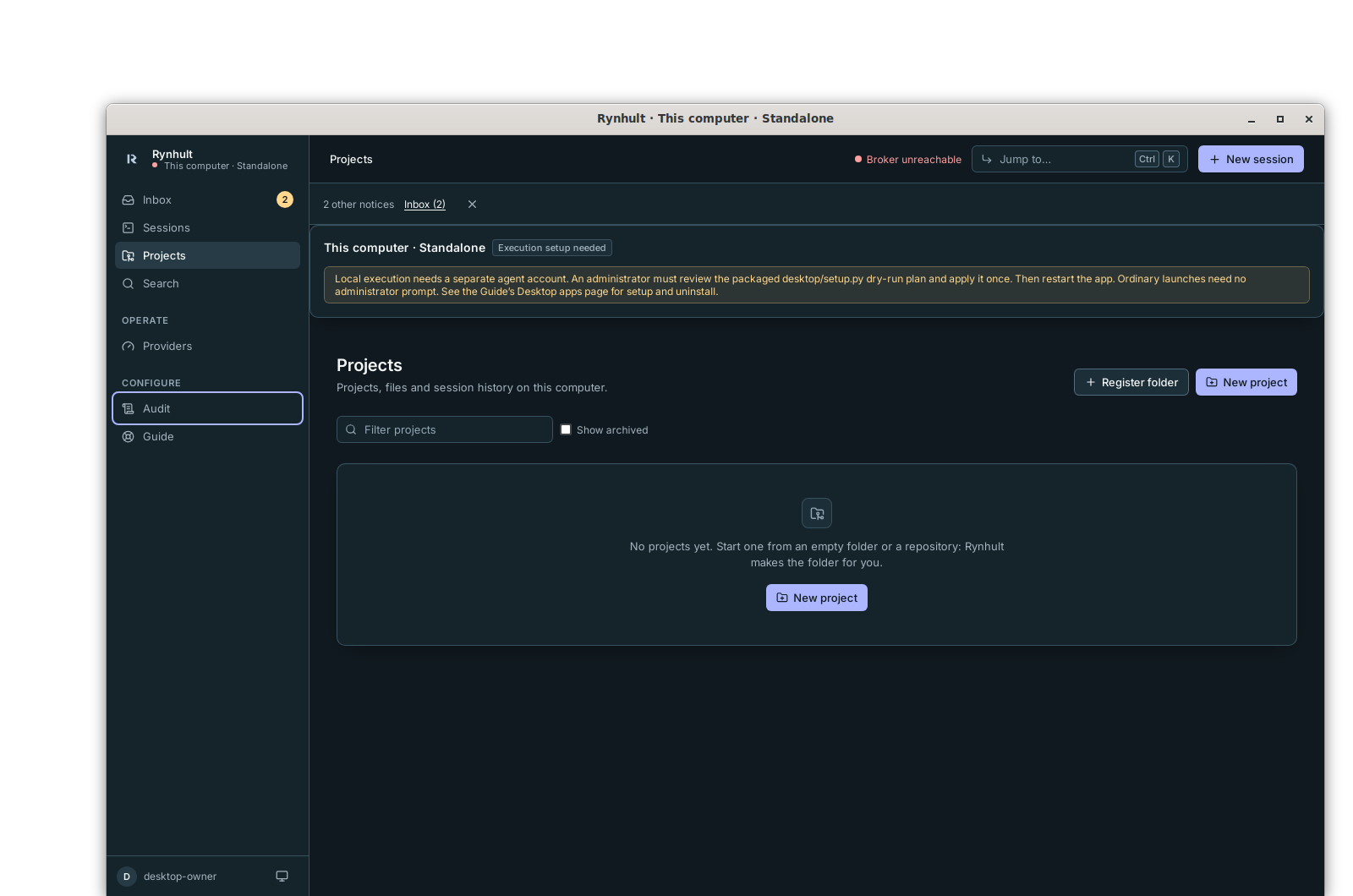
Open the desktop app. It creates one local owner automatically and opens Projects, with This computer · Standalone above the page. There is no server setup token, password or authenticator enrollment for this profile. Missing execution setup is shown explicitly.
-
An administrator reviews the packaged setup program’s dry-run plan. For example, with a fictional desktop login
alex, the installed package paths are:/usr/lib/rynhult-linux-spike/desktop/runtime/python/bin/python3 -I /usr/lib/rynhult-linux-spike/desktop/setup.py install --owner alexRunning the same command as administrator with
--applyperforms the plan. This is a manual setup step; the app does not yet open a graphical elevation dialog. Do not run it from a writable source checkout. Setup creates a locked, expired account namedrynd-<owner uid>that nobody can sign in to (only its desktop service runs it), its home/projects/run folders under/var/lib/rynhult-desktop/<owner uid>, owner access through filesystem ACLs, protected configuration under/etc/rynhult-desktop/<owner uid>and two dedicated systemd units. It grants no sudo permission and exposes no network listener. Review the exact files and commands printed by the dry run. Setup refuses to continue if the account, its configuration or its folder under/var/lib/rynhult-desktopalready exists. -
Restart the app. Ordinary sessions and CLI installation need no further administrator prompt. If setup was refused or skipped, execution stays blocked.
The app refuses old phase 0 profiles containing another owner. Preserve those
files and choose a fresh profile before using this slice; there is no automatic
conversion. The developer profile remains under
~/.config/rynhult-desktop-spike (or the configured XDG config directory).
Install and sign in to a provider
-
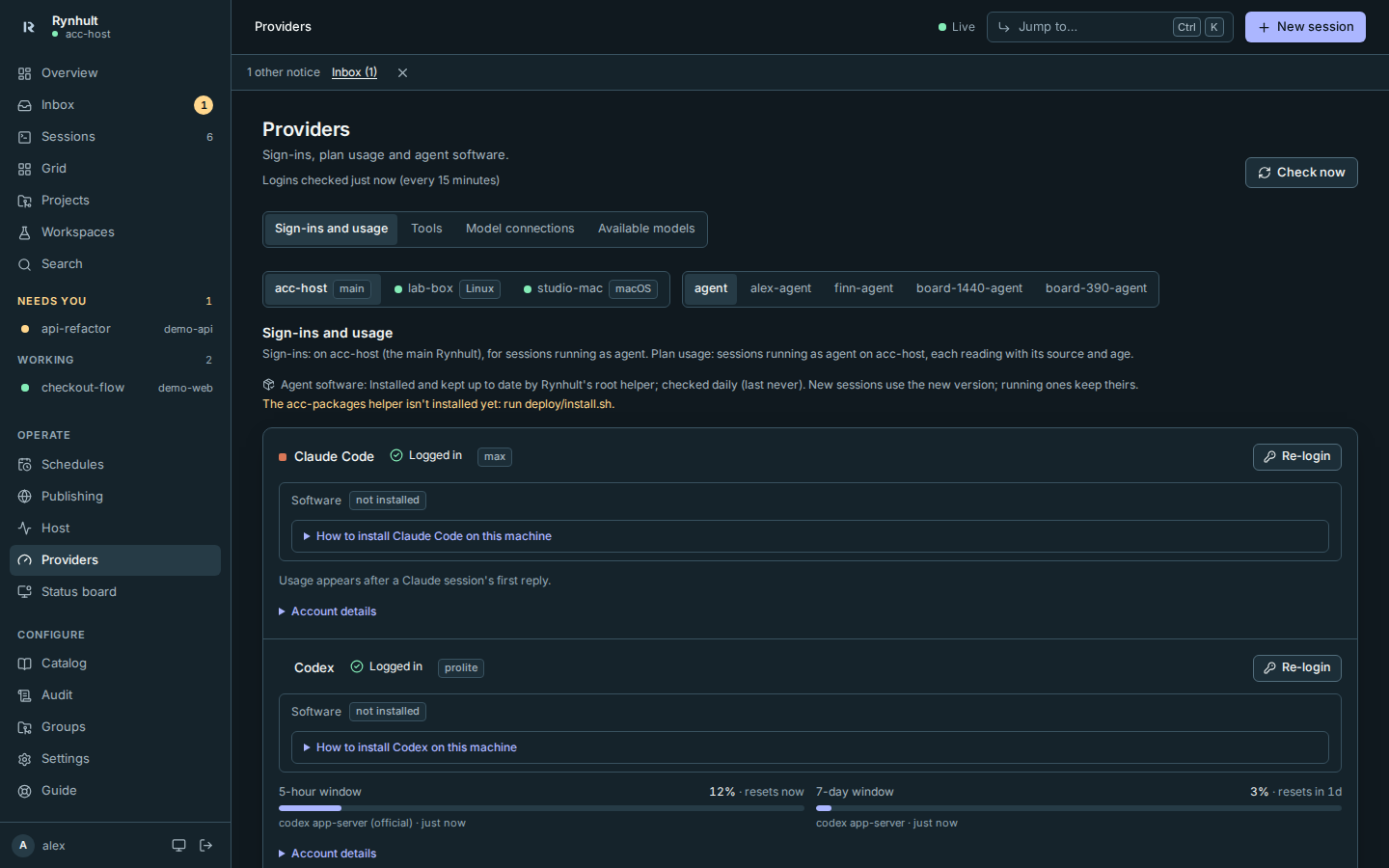
Open Providers. Under Agent CLI, choose Claude Code or Codex, enter an Exact CLI version that you have reviewed, then select Install or update CLI. Review the confirmation and select Install CLI. Installation runs through the broker as the agent account, using npm and an agent-home prefix. No downloaded installer runs as the desktop owner or root.
-
Use the provider card’s Re-login or Log in action and follow its provider sign-in flow. Select Copy login link and open it in your regular browser; the desktop window keeps external navigation closed. If clipboard access is unavailable, the link is selected for manual copying. Paste the resulting authorization code back into the app when asked. Credentials belong to the agent account; the app does not copy the owner’s browser or CLI credentials. Cloud providers still need internet and their own account.
-
Use Check now to refresh status if needed. Stop all running sessions before installing or updating a CLI, and wait for their processes to exit. If stopping is slow or unconfirmed, the update is refused; retry after the session has actually ended. Updates are explicit, never automatic. An exact npm version is a requested version, not a security qualification.
The screenshots use fake provider CLIs and fake npm in a temporary test stack. They demonstrate the UI; real provider login and a real two-account install were not verified on the development host.
Create a project and start work
-
Open Projects, select New project, choose Empty folder or Clone repository, enter a name and create it. Empty folders are trusted by default; review repository trust before using a clone. Folders live under the agent account’s projects root.
-
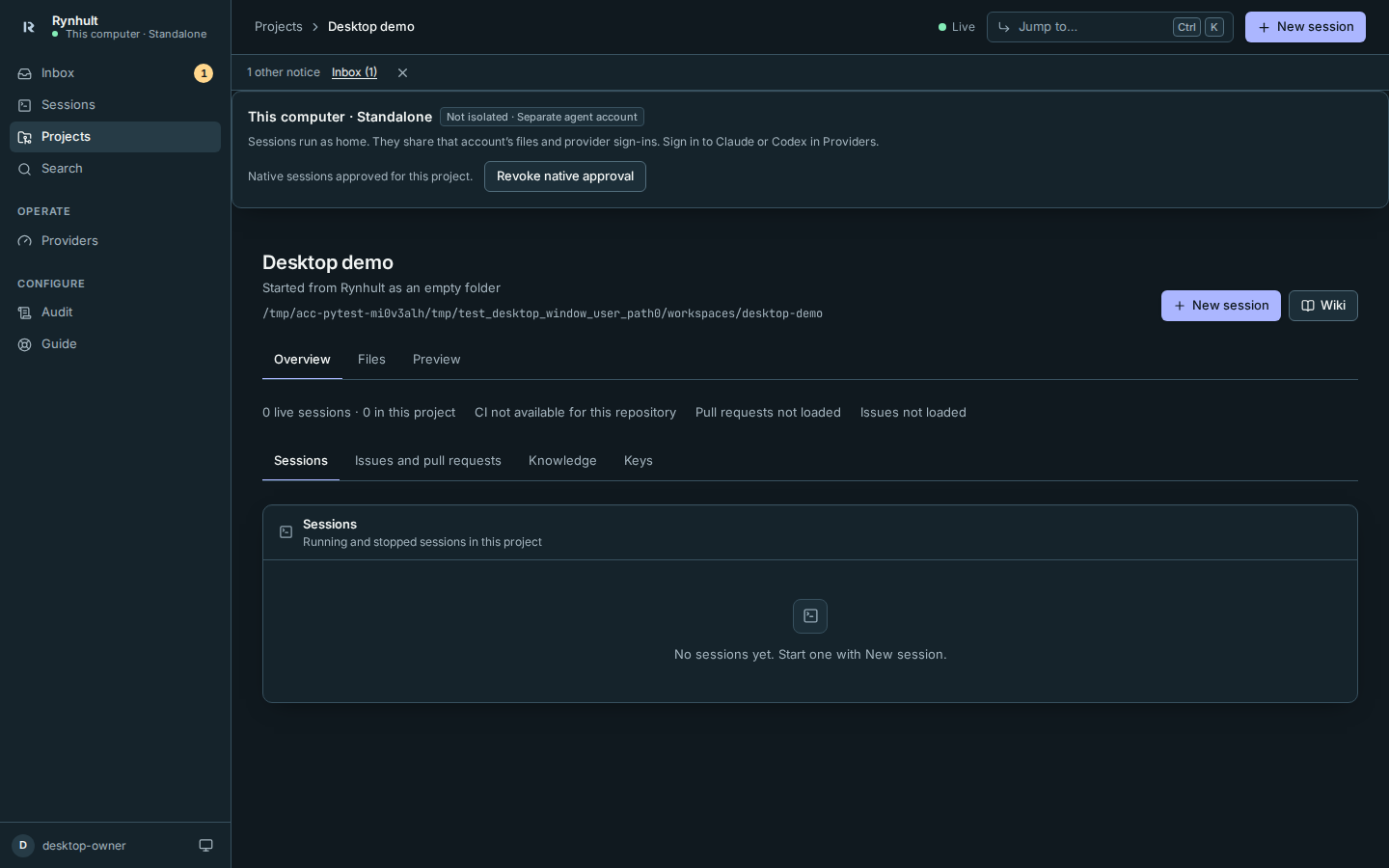
Open the project. Select Allow native sessions for this project, read the account-sharing explanation and select Allow native sessions.
-
Select New session, choose Claude Code or Codex, describe the task and select Launch. The existing session screen opens its terminal. You can type, view activity/history and use Files/Changes through the shared code.
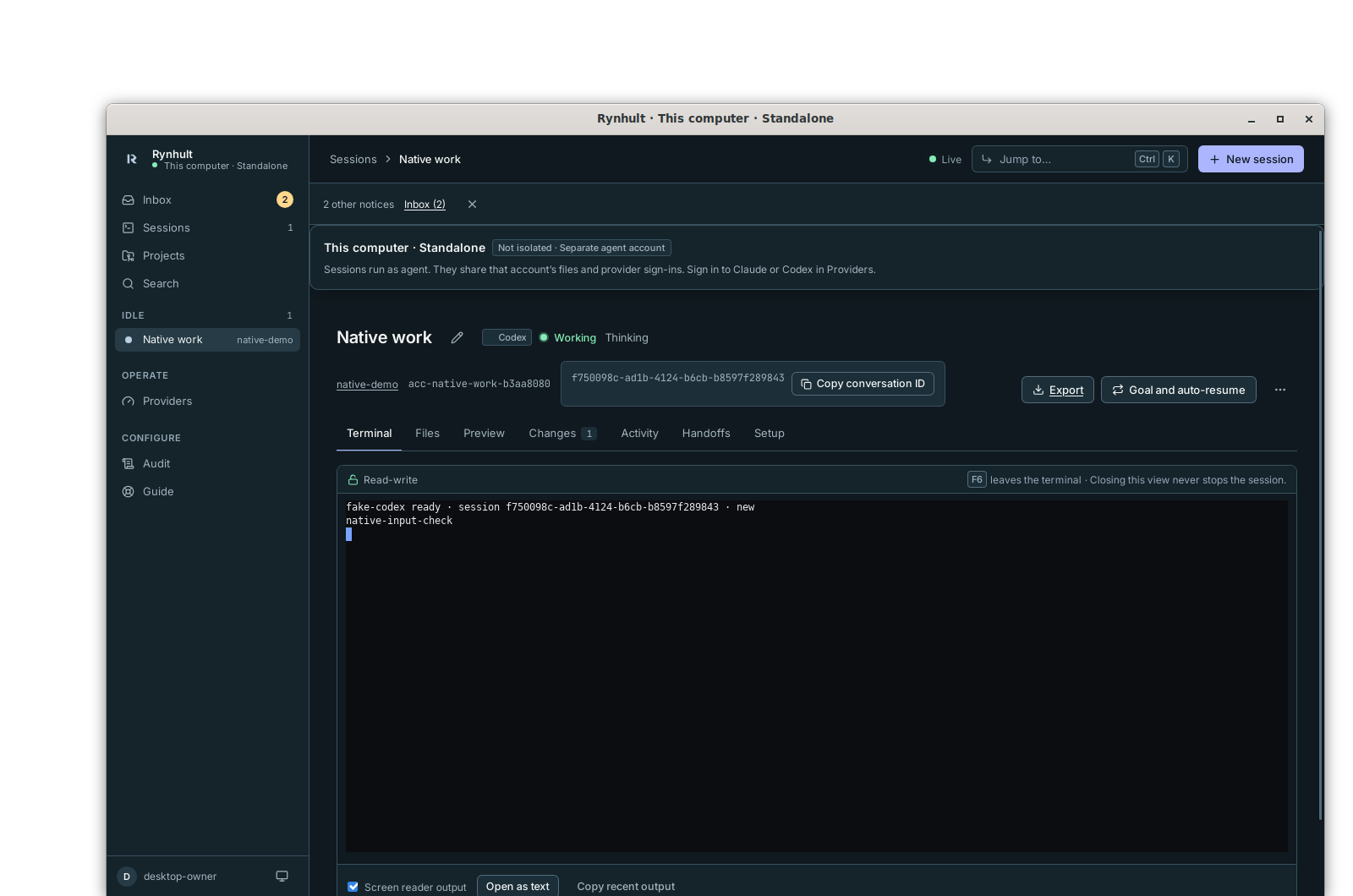
Revoke native approval blocks future launches and resumes; stop existing sessions separately.
-
Stop sessions in their session screen when finished. Closing the app stops its local main and detaches viewers; the separate broker and tmux keep agent processes running. Reopening reconciles the existing sessions. A reboot does not preserve running processes. There is not yet a quit-with-active-work confirmation or operating-system lock integration.
Session history/export uses the existing session tools. A verified standalone backup/restore workflow and moving work to a server remain release work. Do not assume uninstalling the app creates a backup.
Arch packaging and separate-account execution passed automated qualification in a disposable rootless Arch/systemd container using fake Claude and Codex only, including logout/login persistence, cross-user denial and uninstall. This does not qualify your Arch derivative's desktop, kernel, security policy or real provider login. Keep its own repositories/keyring; do not add Arch repositories to Manjaro to resolve dependencies. Physical-machine qualification remains open.
Developer AppImage builds refuse linked tool caches and mismatched cached tools before changing them. A leftover partial download requires explicit cleanup by the builder; never run these build helpers as root.
Developer bundles include the project LICENSE and THIRD_PARTY_NOTICES.md in
the bundled resources’ docs/ directory. This does not make a package signed or
qualify it for your distribution.
Uninstall and recovery
Setup refuses existing destination directories that are symbolic links, writable by other accounts, or not owned by root. An administrator must repair those paths rather than asking setup to follow them.
Stop sessions and close the app first. An administrator reviews the same setup
program’s uninstall --owner alex dry-run plan, then applies it with --apply.
Uninstall first verifies the protected provisioning record and separate agent
account. Missing or mismatched records require administrator recovery review;
it never adopts an account merely because its name matches. It disables only
that owner’s desktop socket/service, requests termination of processes still
running as the agent account (including sessions left running), removes its
scheduled jobs and keeps the account locked and expired, then removes the units
and protected configuration, including the stopped broker socket file. It preserves the locked account, project files,
provider credentials, session spool and desktop profile. Removing just the app
package also preserves work. Account/data deletion requires separate reviewed
administrator action after backup. If cleanup fails, a service stop is unconfirmed,
or agent processes remain after the bounded exit check, uninstall stops before
removing its recovery record and unit files. Resolve the error and retry; do not assume work has stopped.
Automatic adoption of the preserved account
on reinstall is deliberately refused; recovery currently needs administrator
review. Do not delete the account to make an installer retry succeed.
Troubleshooting and limits
- Execution setup needed: ask an administrator to review the setup plan, apply it on the intended computer and restart the app. There is no same-user execution fallback.
- Sessions unavailable (the broker is unreachable): check the owner’s exact
rynhult-desktop-<uid>.socketand.serviceunits and that the installed package has not moved. The app never repairs system services by elevating itself. - An older developer build has an empty terminal or stays at Starting: use the corrected developer package and ask the administrator to review its setup. The broker needs its packaged Python source path, and the owner needs read-only traversal/read access to the root-owned spool directory. Existing setup is not repaired automatically; do not delete an agent account or its work to retry.
- CLI installation fails: check Node/npm availability and the chosen exact version. The app shows the broker’s refusal; it does not switch to a system package install. A failed installation may leave partial files for review.
- Launch requires approval: open that project and review its native consent. Consent is bound to its path and account, so changing either needs new consent.
- Publishing, services/Compose, extra people/machines, schedules and teams are outside this slice. The desktop build hides their navigation. The installed server UI and behavior remain unchanged.
- Signed packages/updates, OS key storage/app lock, full backup/restore, physical GNOME/KDE and Orca qualification are still pending. Headless Chromium tests and a headless native-window check do not qualify all real desktop behavior.
macOS developer setup
The macOS port is not yet qualified on a Mac or distributed as a signed release. Use the coordinator’s reviewed source build and native bundled Python runtime. The installer below is separate from the existing Mac node installer. It provisions execution for one selected local owner.
Qualification blocker: confirm on the Mac that the dedicated agent is
outside staff and cannot read the owner's home. Setup refuses membership in
staff or admin, including calculated membership. If it refuses, stop:
changing home permissions or choosing a VM needs an owner-approved design,
not a bypass of the check. The portable plans below do not resolve this question.
The window first opens Projects automatically, without asking for a server setup token. If execution is absent, its setup note asks for the reviewed Mac execution package. macOS Installer supplies the one-time administrator prompt; the app and broker never run as root. This slice adds no resident root command helper and does not use a deprecated elevation API.
For a fictional owner alex with UID 501/GID 20, a portable plan can be reviewed
on Linux or macOS without changing anything:
python3 desktop/mac_setup.py install --owner alex --owner-uid 501 --owner-gid 20 --agent-id 50001
The administrator must select an unused high UID/GID; setup refuses existing
accounts, groups, data or configuration. It creates a hidden rynd-501 account,
with a disabled password, /usr/bin/false login shell and no admin membership.
Its private home, projects and spool live below
/Library/Application Support/Rynhult Desktop/Owners/501. The owner receives
inherited project/file and read-only spool access, but no access to the agent’s
credential home. Setup clears inherited ACL entries on those new private
directories before adding the selected owner grants. Root-owned configuration and a LaunchDaemon control the
protected socket. Setup also adds a Remote Login (SSH) rule that refuses the agent account, even with
a key, and needs macOS 13 or later for it. Setup stops if the agent would belong to the staff or
admin group, because home folders are readable by staff. It grants no FileVault token, owner
Keychain access, TCC permission or system package installation. Never grant Full Disk Access or other
privacy permissions to the Python inside /Library/Application Support/Rynhult Desktop/Runtime:
the agent’s broker runs that same interpreter, so the agent would gain them too.
On the Mac, choose a native Python 3.12+ interpreter for the coordinator scripts, for example a development interpreter outside the installed execution runtime:
PYTHON=/path/to/mac/python3
"$PYTHON" desktop/build_mac_setup_pkg.py --owner alex --agent-id 50001 --runtime desktop/runtime --out desktop/package/Execution-Setup.pkg
That command still prints a plan. After reviewing it, repeat with --build to
create the unsigned .pkg. Preinstall refuses runtime replacement while an owner
identity receipt remains; do not use it as an in-place upgrade. This needs macOS pkgbuild, the built desktop UI
and a complete native runtime. It does not download dependencies or install
anything. Node/npm, Git and tmux must already be available to the agent; setup
never runs Homebrew or prompts to install developer tools.
Run the coordinator smoke as the ordinary owner:
desktop/tests/mac-phase1-smoke.sh --install --owner alex --agent-id 50001 --python "$PYTHON" --package desktop/package/Execution-Setup.pkg
The script asks you to type CREATE rynd-501, verifies the package’s owner and action recipe, then opens a private package copy in macOS Installer. Inspect the unsigned package before authorizing it; recipe checking is not code-signing verification. Close Installer when it finishes. The script then checks the dedicated account, broker, inherited file access and available provider terminals. Restart the app after setup.
The app uses the installed runtime at
/Library/Application Support/Rynhult Desktop/Runtime, keeping its main, broker
and UI together. It discovers CLIs in the agent’s private prefix, existing Apple
silicon/Intel Homebrew bins and system bins. Use Providers to install a reviewed
exact version and log in through that account, as on Linux. The owner’s CLI
credentials are never borrowed. Headless Claude subscription login can use its
private credential-file fallback when Keychain storage is unavailable; a Console
login that creates an API key requires a writable agent Keychain. Those real
login modes still need MacBook qualification. No owner Keychain is unlocked or
copied by this setup.
A later check needs no administrator prompt:
desktop/tests/mac-phase1-smoke.sh --check --owner alex --agent-id 50001 --python "$PYTHON"
Real CLI terminal probes run only when installed and logged in for this agent;
otherwise the report gives a skip reason. They run --version, with no model
inference. Synthetic smoke workspaces are removed; small test spools remain for
review until full agent removal. Verify the real app’s project approval, session
launch, keyboard input, Files/history, reconnect and quit separately on the Mac.
macOS uninstall
Stop work and close the window. To preserve account and work, build another
reviewed package with --uninstall, then run the smoke script with --uninstall
and that package. It unloads only the selected LaunchDaemon and removes active
configuration/socket, retaining the account, work and root identity receipt.
It also ends everything the agent still runs (sessions, scheduled cron jobs and other
processes), and the smoke check fails if any agent process remains.
For full agent/data/runtime removal, explicitly build the purge package:
"$PYTHON" desktop/build_mac_setup_pkg.py --owner alex --agent-id 50001 --uninstall --purge-agent --remove-runtime --out desktop/package/Execution-Remove.pkg --build
desktop/tests/mac-phase1-smoke.sh --full-uninstall --owner alex --agent-id 50001 --python "$PYTHON" --package desktop/package/Execution-Remove.pkg
This separately asks for DELETE rynd-501 AND ITS DATA before opening Installer. It verifies the recorded account/group identities, stops the exact desktop tmux server and refuses deletion if other agent processes remain. It removes that agent’s work, credentials, account/group, Remote Login rule and setup receipt. Shared runtime removal is refused if other owner receipts remain. Use a coordinator interpreter outside that runtime so the final check still runs after deletion.
Project approval is bound to the agent identity as well as its path/account. Recreating the account requires fresh native approval even when names match.
The owner’s app/profile/history and operating-system Installer receipts are
separate and are preserved. The smoke report lists the Installer receipts left
(installer_receipts_left) with the pkgutil --forget command for each, if you want them gone. Export needed work first; removing the agent’s files
can leave history pointing to removed files. Remove the app/profile separately
only after reviewing backup and recovery. Failed/partial installation is not an
automatic rollback; retain the root receipt for administrator-reviewed recovery.
Existing installation choices
- Install on a Mac adds a Mac to an existing main.
- Install on Windows uses WSL2.
- Notifications and app describes the installed web app, which needs its main to remain reachable.
The full design is in docs/DESKTOP-APPS.md in the source tree.
This page is generated from docs/wiki/User-Guide/Desktop-Apps.md; the same page is under Guide inside Rynhult.