Backups
Database scope: this Rynhult capture/restore workflow supports SQLite. If the owner selected PostgreSQL,
Back up now refuses the capture; an existing acc.db is not the active database. Arrange independent
PostgreSQL database backups and restore drills, plus separate file and secret backups. Disable Rynhult backup
schedules before switching databases. See Getting Started.
Owners use Host → Backups to capture Rynhult's control state and keep an offline recovery kit. You can choose an enrolled Linux machine, S3-compatible storage or an administrator-provisioned local directory. NFS/SMB qualification follows later. Members cannot see backup targets, export kits, start captures or prune.
New targets start with scheduled backups off, daily captures and weekly full restore verification. The independent S3 retention maintenance job is also off by default and installs no timer. Neither a saved target nor a maintenance plan enables captures.
Capture schedule and cloud costs
In Host → Backups → Details, each target has Capture and Full restore verification selectors. Daily capture and weekly full verification are the low-transfer defaults. Hourly capture remains available; select Save schedule to apply it. Saving a schedule does not enable a paused target. Every change is owner-only and audited. The Every capture (high transfer) verification option restores the old behavior.
The first capture always performs a full readback and isolated restore. Later captures run a lightweight
restic check without reading all data packs; the full readback and restore run on the first capture due
at or after the verification interval. Test restore below the history list also performs a full test on demand.
A metadata check is not a restore test: the date of the last full test and its generation remain separate.
If captures cannot finish, verification can also be overdue; check Last job and run an on-demand test.
Targets with no stored interval fields used the old hard-coded defaults; upgrading gives those targets daily/weekly settings. Explicitly stored interval settings are preserved. No snapshots, keys or retention settings are deleted.
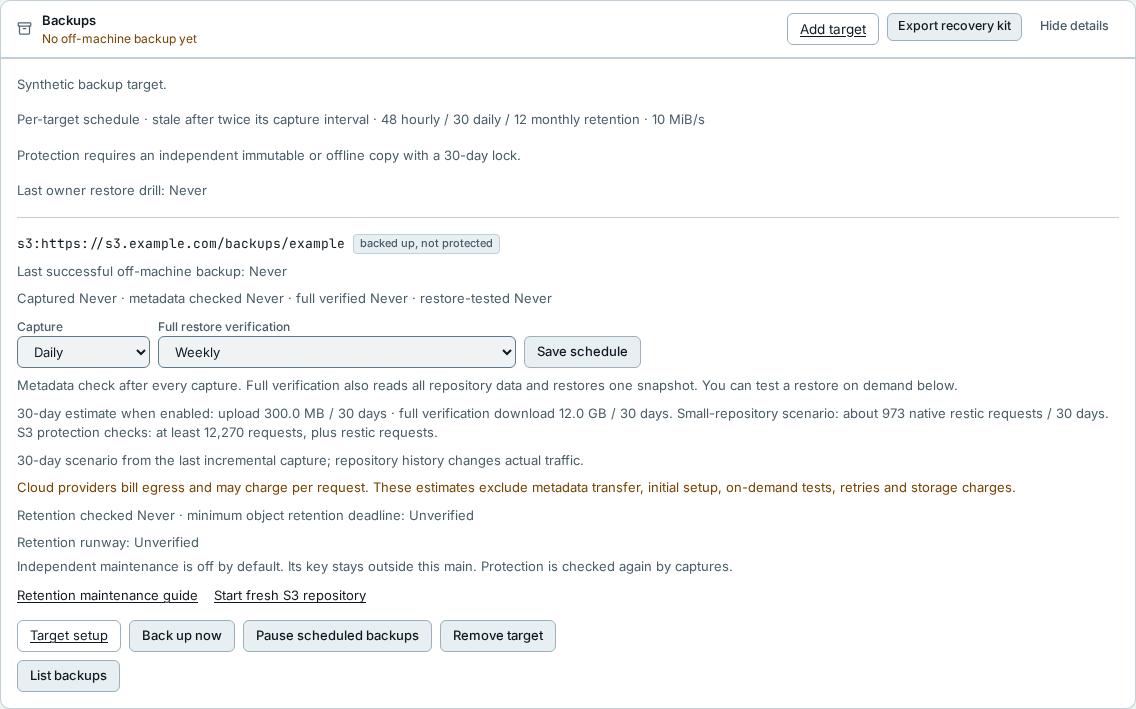
The schedule shows a 30-day estimate when enabled, not a cloud bill. Upload uses the last incremental packed-byte count. Full verification downloads the whole repository plus one snapshot. With no stored-size measurement, the last captured input size substitutes for both: compression can reduce it, retained history can increase it, and metadata traffic is additional. Missing measurements show Unknown until a capture completes, not zero. Native restic request counts use a small two-snapshot test repository as a scenario, not a target traffic measurement. S3 protection request counts cover per-object retention observations only; restic and maintenance add requests. Cloud providers bill egress and may bill requests and storage. Initial setup, manual tests, retries and future growth are excluded. Check your provider's usage report before selecting hourly captures or per-capture full verification.
This is separate from a project's git backup on the main. The roaming fallback transports those git pushes only; it does not move server captures to a roaming machine or make an offline machine available.
Before you start
For an enrolled Linux machine, use Host → Backups → Set up (or Add target). Install Rynhult's pinned restic on the main through its existing package helper first. The owner deploys matching reviewed Rynhult code to the node independently; do not use main-controlled root updates on a backup target. If the node is old, run the receiver setup block first to establish the root-helper conditions, then update it manually from independently trusted source before Check setup. The existing node installer preserves those condition drop-ins. Rynhult never gets a root shell on the target.
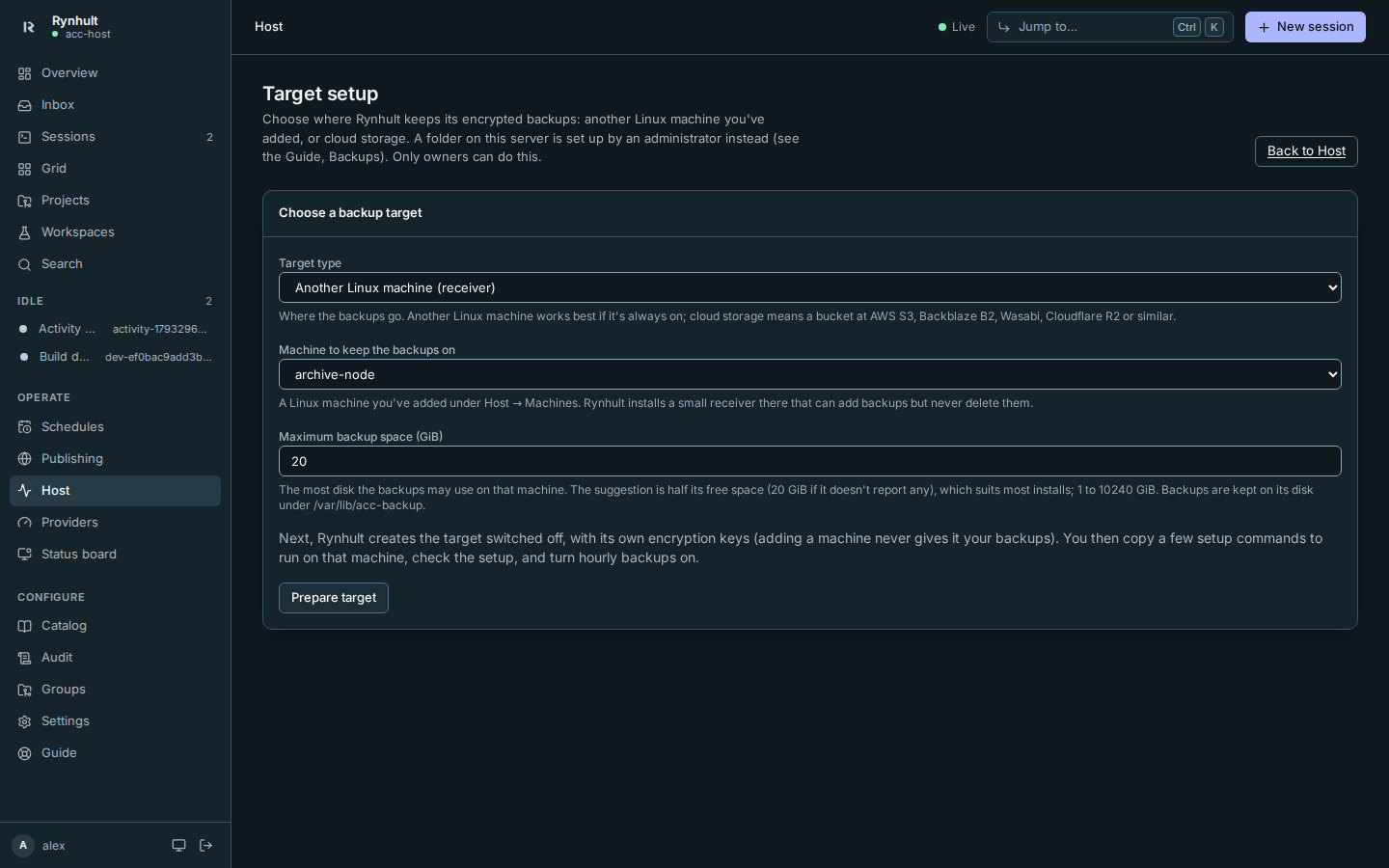
- Choose Another Linux machine (receiver) under Target type, select the Machine to keep the backups on and review Maximum backup space (GiB) before selecting Prepare target. The default is 50% of the reported free space on the filesystem containing
/var/lib/acc-backup, rounded down to whole GiB, or 20 GiB if capacity is unavailable. The allowed range is 1–10240 GiB. This creates a disabled target and saves your chosen ceiling.
 2. On Target setup, review the exact commands. Select Copy target commands to copy the entire block, then run it yourself as root on that machine. Copied confirms success; if clipboard access is refused, Rynhult selects the commands so you can copy them manually. They install
checksum-verified rest-server 0.14.0, a dedicated non-login account, a private repository and an append-only
service reachable only on target loopback. The commands require existing systemd, Python 3, runuser, curl, tar and sha256sum.
They stop and block Rynhult's main-controlled root update and system package helpers while the target
binding exists. Target code/software updates now require independent owner review. Wait for any active
helper job to finish before rerunning setup. Keep all broker accounts free of sudo/Docker privileges;
do not enable other main-controlled root automation on this target.
They reserve target loopback port 18762 and apply your saved per-repository ceiling. Existing targets retain their original ceiling (100 GiB for targets prepared before this setting). Review disk space and use a
separate filesystem/quota; a hostile writer can still fill a disk. Do not grant Rynhult sudo, SSH or maintenance access.
2. On Target setup, review the exact commands. Select Copy target commands to copy the entire block, then run it yourself as root on that machine. Copied confirms success; if clipboard access is refused, Rynhult selects the commands so you can copy them manually. They install
checksum-verified rest-server 0.14.0, a dedicated non-login account, a private repository and an append-only
service reachable only on target loopback. The commands require existing systemd, Python 3, runuser, curl, tar and sha256sum.
They stop and block Rynhult's main-controlled root update and system package helpers while the target
binding exists. Target code/software updates now require independent owner review. Wait for any active
helper job to finish before rerunning setup. Keep all broker accounts free of sudo/Docker privileges;
do not enable other main-controlled root automation on this target.
They reserve target loopback port 18762 and apply your saved per-repository ceiling. Existing targets retain their original ceiling (100 GiB for targets prepared before this setting). Review disk space and use a
separate filesystem/quota; a hostile writer can still fill a disk. Do not grant Rynhult sudo, SSH or maintenance access.
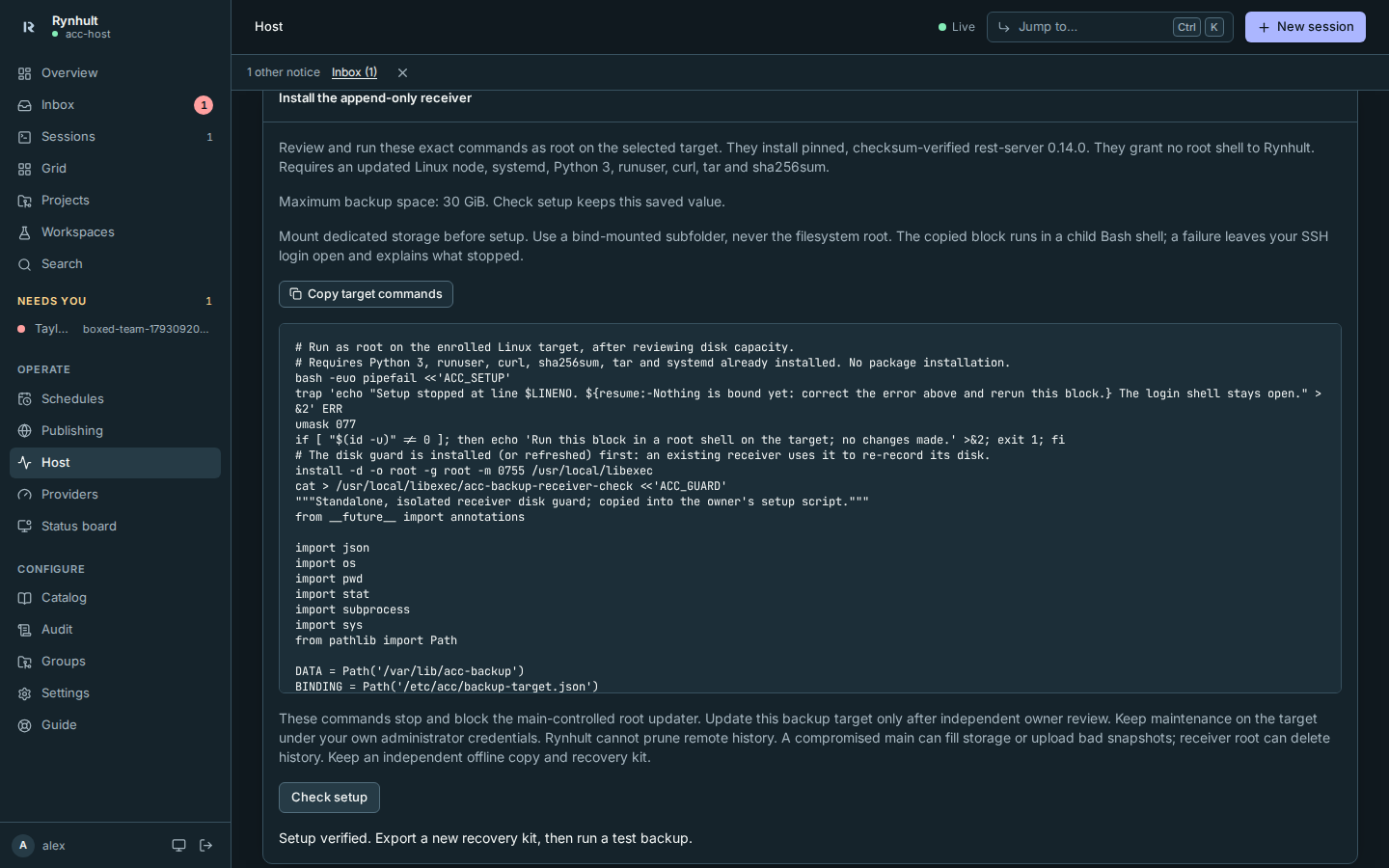
- Select Check setup. This checks the machine link, encrypted repository integrity, read/write and refusal to delete or overwrite a disposable encrypted snapshot. It keeps the ceiling chosen at preparation. Fix the displayed error before continuing.
- Export a new recovery kit after setup succeeds, then follow Save the kit and make a backup below. A kit exported before verification cannot enable scheduled backups.
An append-only receiver preserves old ciphertext against a compromised main using its ordinary writer credentials. It does not constrain target root or receiver-account compromise, and is not a timed immutable window. Keep an independent offline/immutable copy. Only the main encrypts/decrypts; the target never receives the repository key. The separate transport token grants ciphertext access only. Root commands contain its verifier, not either key.
For an administrator-provisioned local directory:
Ask your local administrator to install Rynhult's pinned restic with acc-packages and provision a fresh directory
outside the installation tree. Use the same filesystem account as Rynhult for repository provisioning. The administrator
must approve the directory and ensure its permissions and capacity; the dashboard never accepts a destination path.
For example, after the administrator prepares /mnt/recovery for the Rynhult service account:
# Administrator, through Rynhult's fixed package helper:
sudo /usr/local/sbin/acc-packages --install restic
# Rynhult service account, from trusted matching Rynhult source/virtualenv:
python -m acc.backup_server add-local --data /srv/acc/data --repository /mnt/recovery/example-acc
This downloads the official pinned binary and checks its committed SHA-256. It does not install a system package. A new target starts with its schedule disabled. Its defaults are daily capture and weekly full restore verification.
Save the kit and make a backup
- Open Host → Backups. Each target shows the age of its captured data, verification and isolated restore test.
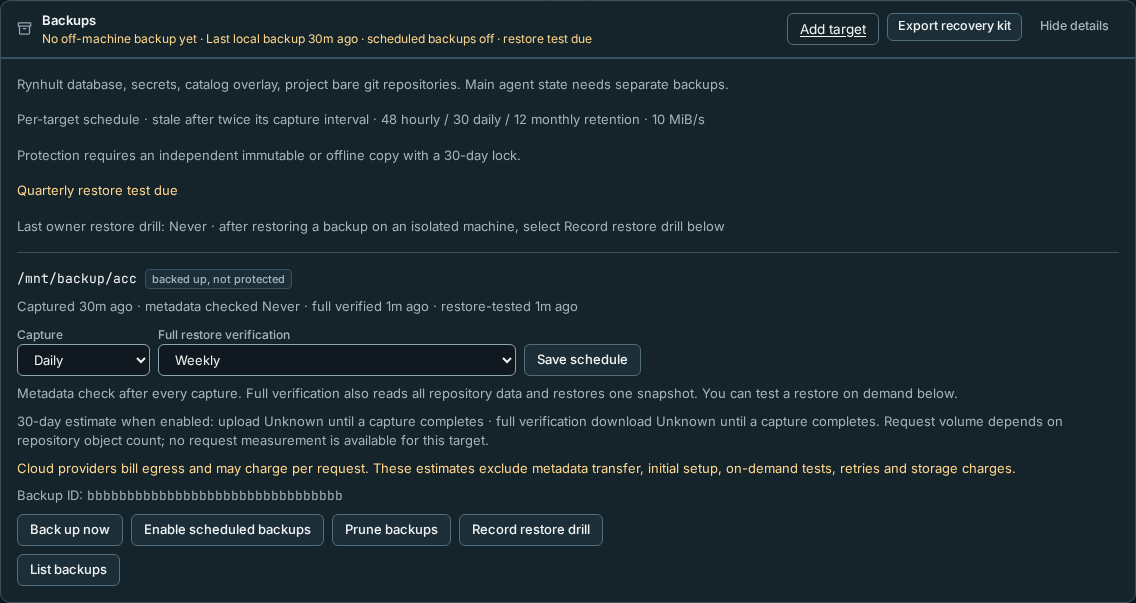
- Select Export recovery kit, read the confirmation and select Export recovery kit again. Save the JSON attachment in a password manager and keep one offline copy in a separate failure domain. Treat it like a BitLocker recovery key: the kit plus repository access unlocks all backed-up Rynhult secrets. Never attach it to a session, paste it in chat or include it in an artifact. The attachment is ordinary text; print it from a trusted local editor with line wrapping if you want paper custody. Export a new kit after adding a target.
- Select Back up now. The durable job moves from queued to running to complete. The first capture reads back data and performs an isolated restore with file hashes, database integrity, vault decryption, catalog references and git connectivity checked. Later captures run metadata checks unless full verification is due; completion alone does not say that the newest snapshot was fully restore-tested. A failed job leaves the previous successful evidence visible.
- Select Enable scheduled backups after saving both kit copies and completing a test capture. Confirm that you saved the kit. Captures run daily by default and become stale after twice the selected interval (48 hours daily, 2 hours hourly). Each target has its own capture, metadata-check and full-verification ages.
- Copy the explicit Backup ID, its snapshot ID, the capture time and the signing-key fingerprint into your independent recovery/drill record. An old valid signature cannot prove freshness. Keep this record outside the main and target. The snapshot ID matters if the main is ever compromised: whoever controls the main can add a second backup under an old backup ID, and only the snapshot ID you recorded tells the genuine one apart.
What you should see: an enrolled Linux receiver shows append-only receiver · independent offline copy still required; a local target, and S3 without verified retention, show backed up, not protected. Only verified S3 COMPLIANCE retention can earn protected · verified 30-day Object Lock; see the S3 section below. Protection needs an independent immutable or offline copy with a 30-day lock; Rynhult does not enforce that window.
Test recovery every quarter
For an online check, open Host → Backups → Details → List backups and select Test restore beside an explicit generation. Each row shows the backup ID, its time and the start of its snapshot ID. The queued job checks all repository data and restores that snapshot into private scratch on the main, validates it and removes scratch. Check Last job for completion. No live data is replaced. This is not a replacement-host drill or evidence that the old main was fenced. After an offline restore drill (below), select Record restore drill beside the generation you restored, even an older one; the target card's button records the latest.
When a snapshot is selected, the drill record and Audit keep its full snapshot ID as well as the backup ID. This distinguishes duplicate backup IDs; it remains your attestation, not an automated proof that the restore succeeded.
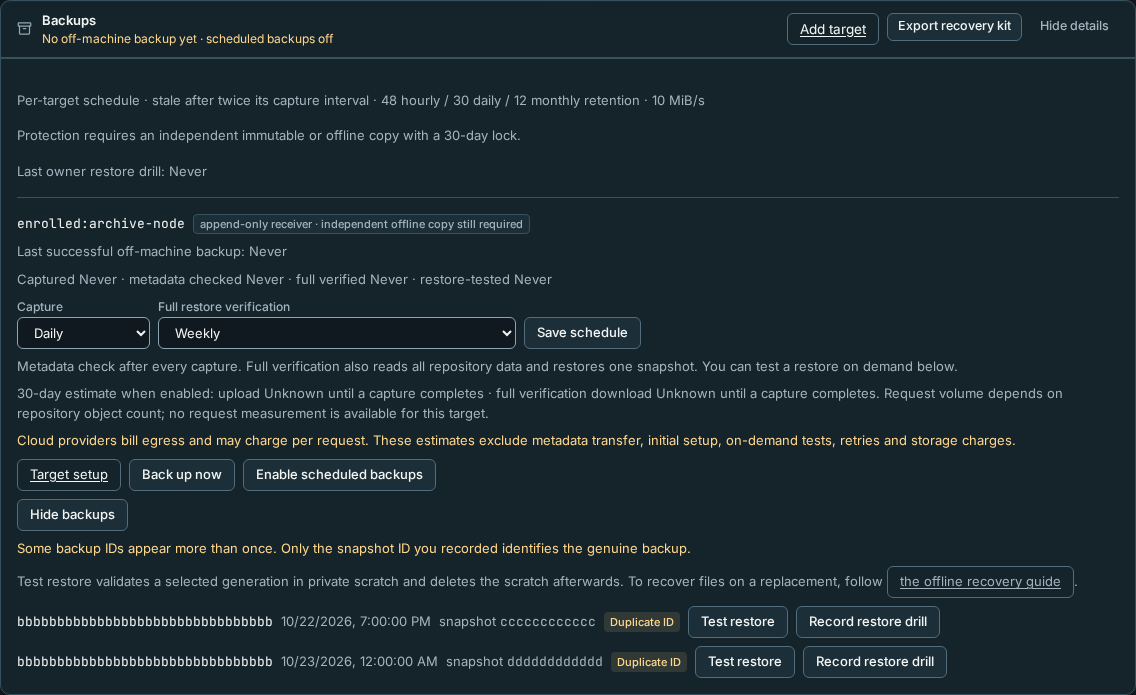
Two warnings can appear above the list:
- Some backup IDs appear more than once (rows marked Duplicate ID): something with the main's credentials added a backup under an existing ID. Treat the main as suspect. Compare snapshot IDs with your record and test only the one you recorded.
- The target no longer lists the last verified backup: the target lost, withheld or rolled back history. New captures to it stop with target is missing the last verified backup until you investigate on the target.
For independent recovery from a machine target, its administrator exports the ciphertext directory
/var/lib/acc-backup/TARGET_ID to secure removable storage or an administrator-controlled transfer.
Neither the dead main's link nor its transport credentials are needed. On the replacement use:
python -m acc.backup_server restore --kit /secure/acc-recovery-kit.json \
  --target-id TARGET_ID --backup-id BACKUP_ID --snapshot-id SNAPSHOT_ID \
  --repository /secure/exported-repository --destination /secure/example-replacement
--snapshot-id is optional while the backup ID is unique, and required when it is not: the restore refuses to guess.
Keep IDs, repository password and signing public key unchanged. The exported directory contains restic's
config, data, index, keys, locks and snapshots; it is not the receiver's parent directory.
Rynhult reminds owners in Inbox after 90 days. Use the saved kit to restore an explicit recorded backup into a fresh, private directory on an isolated machine, with the old main fenced before any replacement gains authority:
python -m acc.backup_server restore --kit /secure/acc-recovery-kit.json \
  --repository /secure/exported-repository \
  --target-id TARGET_ID --backup-id BACKUP_ID --snapshot-id SNAPSHOT_ID --destination /secure/example-replacement
--repository is the exported ciphertext directory. For an enrolled Linux machine or S3 target it is required: their
kits record the target (enrolled:…, s3:…), not a path. For a local-directory target you can leave it out and
mount or copy the repository at the kit's recorded path instead. Never edit the kit's IDs, passwords or signing
public key.
Use trusted Rynhult source of the captured version/build and Rynhult's pinned restic, obtained independently of the target.
The restore CLI uses /usr/local/bin/restic by default; use --restic /trusted/path/restic
when the independently verified binary is elsewhere. Known refusals name the
failed check; unexpected errors omit exception details to protect secrets.
The CLI validates in temporary scratch first, revokes captured browser sessions/invites, records a restore audit
and publishes a fresh tree only on success. It never overwrites an
installation. data/RESTORE-HOLD makes Rynhult serve only quarantine responses before migrations, authentication,
node links, supervisors, publishing or autostart. This restore command does not install, activate or promote
anything. The separate, off-by-default replacement controller is described under
Replacement activation candidate; it requires independent fencing and approval.
What quarantine preserves and revokes
The app starting with restored data is expected to return HTTP 503, including health, login and list APIs.
That is a successful quarantined startup, not an app failure. Keep the hold; inspect counts and spot checks in
a read-only copy of the SQLite database and restored files. Do not delete RESTORE-HOLD just to inspect projects.
| Restored material | Ordinary offline restore | --prepare-replacement |
|---|---|---|
| Browser login sessions and invites | Deleted | Deleted |
| Paired browser/native devices | Captured statuses preserved | All revoked |
| Vault ciphertext and its matching data key | Preserved together | Preserved together |
| Old installation API token | Preserved, unusable while held | Removed; no new token created during preparation |
| GitHub, Cloudflare and setup-token files | Captured files preserved | These legacy token files removed; other credentials still need review |
| Runtime authority | Quarantine only | Quarantine plus a plan for separate reviewed installation/control release |
A revocation made after the snapshot cannot be recovered from that snapshot. Compare independent revocation records before any replacement gains authority. An ordinary restore can therefore contain an active device record that the lost main later revoked; the hold prevents it being admitted. Replacement preparation revokes captured devices instead of treating them as fresh authority. Neither path recovers excluded provider logins/transcripts, dirty workspaces or running agents. The kit unlocks the repository; the captured matching vault key unlocks its vault values. Protect both the kit and the decrypted restore tree.
The automated RC rehearsal covers both paths with synthetic data, a real local restic repository, source-tree loss, a saved kit and the offline CLI. It does not qualify a real-host fencing/activation drill, S3, external PKI recovery or PostgreSQL. Developer instructions: Synthetic restore rehearsal.
After completing the drill, select Record restore drill on the target card. It records the backup ID shown there (the target's latest) as your attestation, not an automatic proof of fencing or a measured recovery-time guarantee. Retain an off-main record too: Rynhult cannot notify you while its main is dead. Detailed operator steps are in Operations.
Retention and exclusions
For enrolled targets, retention is performed separately by the target administrator with independent maintenance credentials on a trusted maintenance host. Rynhult refuses remote prune, even through its API. Never expose a non-append-only service or give the main a target administrator credential. Stop the receiver and coordinate capture downtime before filesystem maintenance. Preserve every retained snapshot's references; use restic forget/prune rather than deleting files by age.
For local targets, only owners can select Prune backups and confirm deletion outside 48 hourly / 30 daily / 12 monthly retention. Prune requires a verified generation and a fresh repository data check. Upload/download commands default to 10 MiB/s. Ordinary captures never prune.
Each capture checks repository metadata. At the full-verification interval (weekly by default), it also fully reads repository data and tests restoration of the selected snapshot. Large full verifications can take longer than the capture interval; a restic command has a two-hour deadline. The node connection tolerates a long upload or download while either direction makes progress, and still closes stalled connections. With the main and node updated, a client that finishes sending its request can still read the complete response; finishing an upload does not cancel the receiver's remaining reply or hold up the next connection. Older nodes keep their previous connection-close behavior; update the backup node as well as the main to support delayed replies after a request half-close. If a failure names repository lock refresh failed, check the receiver's connectivity and storage. Operation cancelled inside restic or cancellation cause unavailable does not establish which component cancelled it. Error details use fixed classifications, never raw restic output or credentials. A failed check leaves the last verified backup age unchanged.
The payload includes the DB and its matching vault key, all main secrets, the full catalog overlay, and bare git repositories including kept rewrites and orphans. Repositories have individual capture times; DB and git are not one atomic transaction. Main-host agents are allowed, but their workspaces, dirty trees, provider transcripts/logins, run folders, containers/volumes and published application data need separate backups. Remote-spool history is omitted. TLS/private-CA escrow and reviewed host configuration are recovery prerequisites; the tool does not read root-only PKI material or execute saved configuration.
Troubleshooting
| Symptom | What to do |
|---|---|
| No target | Select Set up to choose an enrolled Linux node, or provision a local directory. |
| Target check failed | Update the Linux node, check its connection and owner-installed receiver service/auth/binding. Never disable append-only to make a check pass. |
| Existing target binding/account | Setup requires a fresh receiver; review partial setup manually before retrying. Do not overwrite an existing repository. |
| Schedule cannot enable | Export a kit containing this target, save both copies and complete a verified test capture. |
| Stale or failed backup | Check the mounted directory, pinned restic, capacity and the last job. Last good age uses capture time. |
| Capture blocked by update | Finish or review the interrupted update before clearing its durable hold; never clear it during an update. |
| Staging budget exceeded | Rynhult keeps only the newest failed upload's staging folder, and none while every target is disabled; each new capture supersedes older ones and removes them (audited as backup.staging_discarded). If the budget is still exceeded, check free space and the capture size. |
| Repository locked (restic exit 11) | Host → Backups → Details shows the reported host, PID, lock age and type, when available. Rynhult automatically removes a lock and retries once only when every lock is older than four hours or was left by its own ended restic run. Otherwise wait for the active job, or confirm Remove stale lock, which removes only locks older than 30 minutes (live restic refreshes its lock every 5) or left by Rynhult's own ended runs, one by one, then retry the backup. A matching host name alone never counts. The action is audited and never removes active locks. Unknown/malformed metadata requires administrator review. |
| Failed job | The job's error names the reason, for example restic backup failed (exit 1) (target unreachable, full or refusing writes) or insufficient staging budget. interrupted: Rynhult stopped during the job means Rynhult restarted while the job ran; there's nothing to clean up. Other errors show only their type; details stay out of the database. |
| Restore refused | Check the saved kit, repository identity, explicit ID, trusted Rynhult version/build and a fresh destination. Do not bypass hashes or signatures. |
| Quarantine HTTP 503 | Expected after restore. Keep the hold while reviewing fencing, old authority, PKI and local workloads. |
Use encrypted scratch disks. Deleting temporary files does not securely erase their former contents.
A capture waits for a catalog edit in progress (up to 30 seconds, without holding off other database work) and then takes the short database barrier. A capture that cannot acquire a maintenance or catalog lock in time fails instead of waiting indefinitely. Retry after other maintenance finishes. Catalog lock files are private to the Rynhult service account; upgrading also tightens existing lock files. A persistent failed capture needs administrator review.
If a request races the database snapshot, Rynhult returns HTTP 503 with Retry-After: 1 and a maintenance-busy message, including for Git pushes. Retry shortly; automatic Git backups retry at the next scan (within a minute) without recording a failed backup. If the server keeps answering 503 for 15 minutes (for example a standby without authority, a proxy, or a maintenance lock that is never released), the project's backup shows as failed with that reason, and the service log warns after 5 minutes of skipped supervisor passes. File copying and uploads do not hold the database barrier.
Copying the target commands never provisions the receiver; Check setup remains a separate action.
S3-compatible storage
Use an existing bucket on AWS S3, Backblaze B2, Wasabi, MinIO or R2. Rynhult uses restic’s S3 backend; provider APIs and retention features differ. No provider is assumed immutable from its name. Only encrypted restic objects leave the main. The store sees object sizes, timing and repository structure.
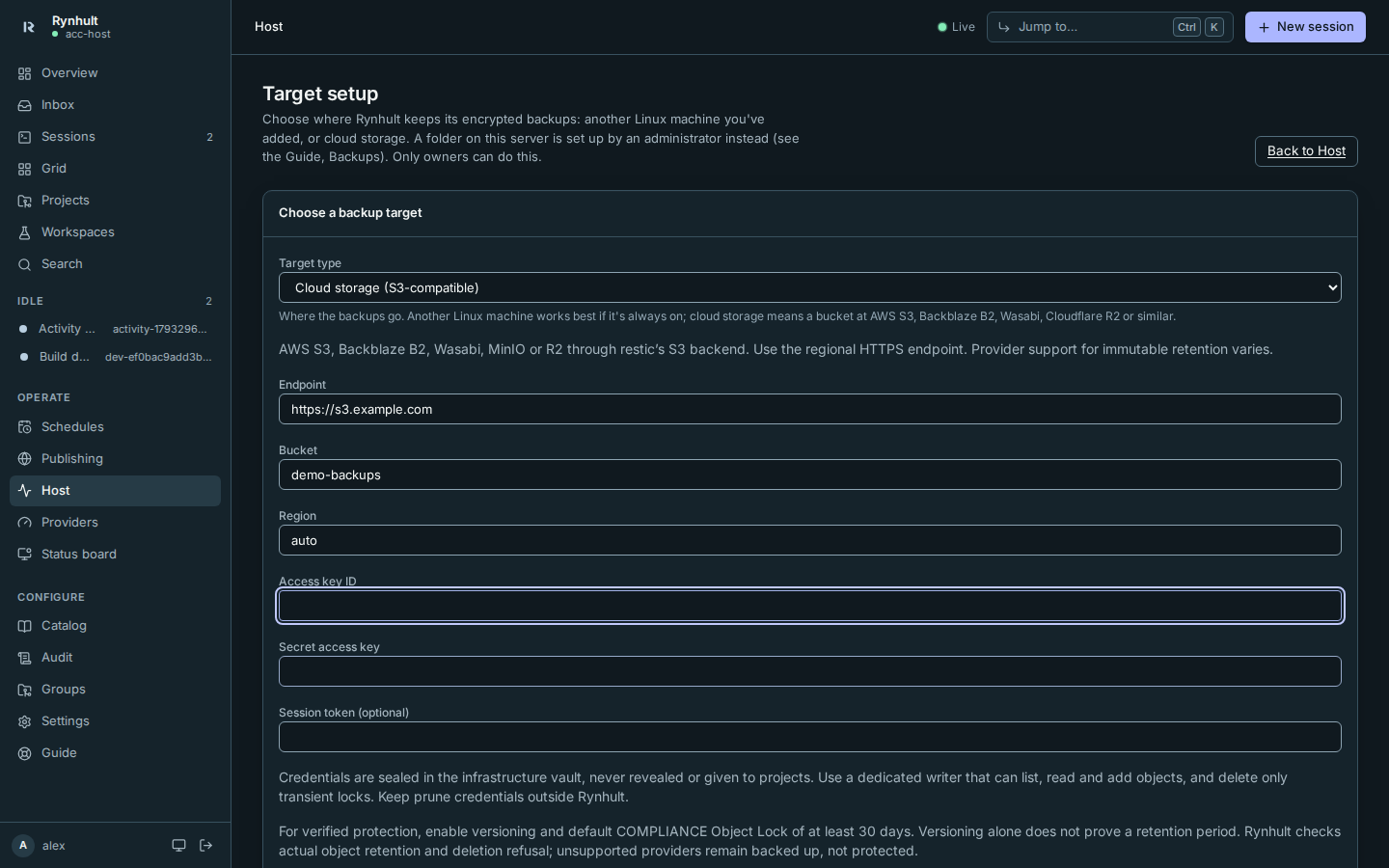
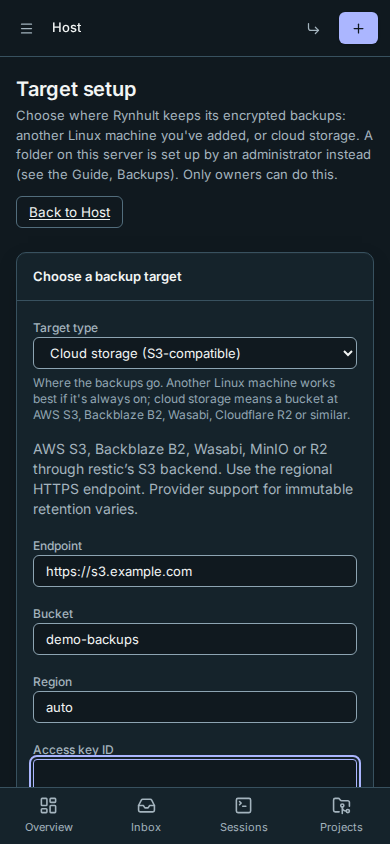
- Open Host → Backups → Set up (or Add target), then choose Cloud storage (S3-compatible) in
Target type. Enter the regional HTTPS Endpoint, Bucket, Region, Access key ID,
Secret access key, and Session token (optional). For example, use
https://s3.example.com,demo-backupsand the region your provider supplies (autowhere required).
- Select Prepare S3 target. Rynhult seals the writer in its infrastructure vault. It is never revealed, exported in the recovery kit, given to a project or sent to an enrolled machine. The new target is disabled.
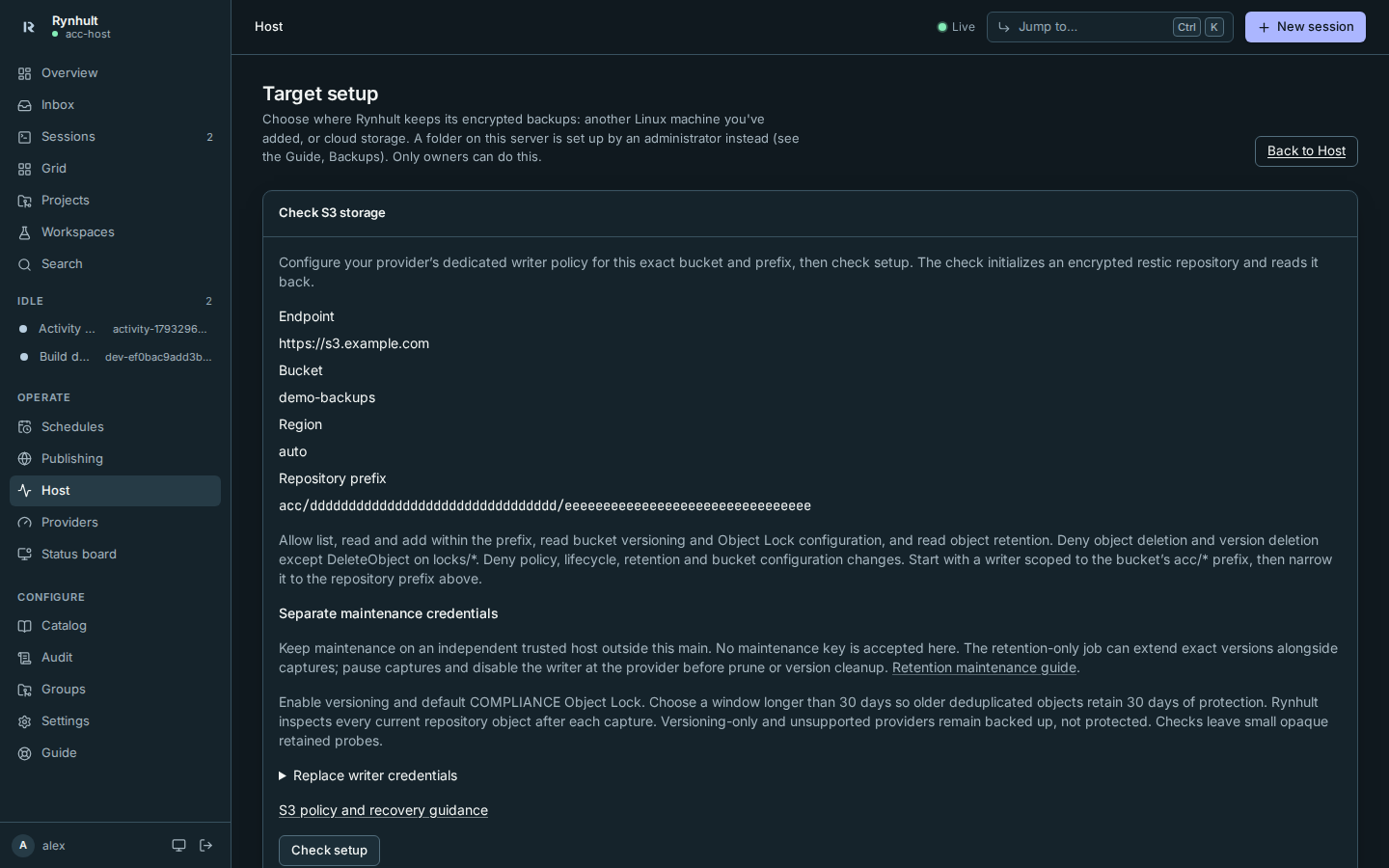
- On Target setup, copy the Repository prefix into your provider policy. Each installation/target
gets an independent prefix and repository encryption key. Narrow the writer to that prefix before checking.
Initially scope it to the bucket’s
acc/*prefix if you need to create the key before preparing the target.
 4. Give the writer list/read/add and transient-lock deletion only, as below. Keep the provider administrator
and maintenance identities independent of Rynhult. Configure bucket versioning and default COMPLIANCE Object Lock
with a retention window longer than 30 days; 60 days leaves room for older deduplicated chunks. Do not grant
retention bypass, policy, lifecycle or bucket configuration changes to the writer.
5. Select Check setup. Rynhult initializes/binds the encrypted repository and checks integrity. When supported,
it checks bucket settings, the actual retention of a disposable encrypted snapshot, and refusal of both
ordinary deletion (which could create a delete marker) and version deletion, including a bypass attempt.
Small valid encrypted probe snapshots remain until independent maintenance removes them after retention.
A setup success with not protected means repository IO worked but immutable retention was not verified.
Rechecking S3 setup pauses scheduling; re-enable it after a successful check and test capture.
6. Export a new recovery kit, keep both copies, run Back up now, and enable scheduled backups as above.
List backups, Test restore and Record restore drill work as for enrolled targets.
4. Give the writer list/read/add and transient-lock deletion only, as below. Keep the provider administrator
and maintenance identities independent of Rynhult. Configure bucket versioning and default COMPLIANCE Object Lock
with a retention window longer than 30 days; 60 days leaves room for older deduplicated chunks. Do not grant
retention bypass, policy, lifecycle or bucket configuration changes to the writer.
5. Select Check setup. Rynhult initializes/binds the encrypted repository and checks integrity. When supported,
it checks bucket settings, the actual retention of a disposable encrypted snapshot, and refusal of both
ordinary deletion (which could create a delete marker) and version deletion, including a bypass attempt.
Small valid encrypted probe snapshots remain until independent maintenance removes them after retention.
A setup success with not protected means repository IO worked but immutable retention was not verified.
Rechecking S3 setup pauses scheduling; re-enable it after a successful check and test capture.
6. Export a new recovery kit, keep both copies, run Back up now, and enable scheduled backups as above.
List backups, Test restore and Record restore drill work as for enrolled targets.
After every capture, Rynhult inventories every current repository object's explicit version and reads that version's COMPLIANCE retention, including old chunks reused by deduplication. It repeats the inventory after the scheduled check (metadata-only between weekly full readbacks and isolated restores); both key/version inventories must match. Transient locks are excluded. Concurrent overwrites, missing version IDs or insufficient retention leave the capture backed up, not protected, rather than crediting a replacement object's retention to the original ciphertext. protected · verified 30-day Object Lock requires a recovery-kit export bound to that repository, capture and retention checks newer than twice the selected capture interval, full verification within its verification interval plus that freshness allowance, and at least 30 days remaining on every object. A protection receipt made before version-bound verification does not qualify after upgrading; run Back up now to obtain fresh evidence. Existing encrypted backups and the recovery kit remain usable. A failed latest job removes the claim. Versioning alone, governance mode, unsupported/read-denied retention APIs, expired objects, incomplete listings and insufficient retention never qualify. Retention deadlines must include UTC or an explicit timezone offset; ambiguous local timestamps cannot establish protection. A repository over 100,000 inspected objects needs independent assessment; Rynhult withholds protection. Provider checks are observations, not an IAM policy proof: independently review all permissions, bucket lifecycle rules and other identities. Version-bound verification assumes the writer cannot delete any non-lock object versions or override retention, and that independent pruning or version cleanup does not run concurrently. Monotonic retention-only extension may overlap capture. A finite snapshot probe cannot establish those permissions for every key; review the provider policy independently.
Old deduplicated chunks may lose their 30-day remaining window before new snapshots do. Your independent maintenance process must extend their COMPLIANCE retention or rotate to a fresh repository/key/kit before that happens. Object Lock preserves versions, not the current namespace: a compromised writer can overwrite objects; recover original versions using provider version tools and your off-main snapshot/identity record. Account closure, provider failure and a compromised main forging new captures remain outside this guarantee.
Writer permissions
For AWS-style policies, allow these actions only for the dedicated bucket/prefix:
| Resource | Allowed actions |
|---|---|
| Bucket | s3:ListBucket (prefix restricted), s3:GetBucketLocation, s3:ListBucketMultipartUploads (prefix restricted) |
| Bucket configuration (read only) | s3:GetBucketVersioning, s3:GetBucketObjectLockConfiguration |
| Repository prefix objects | s3:GetObject, s3:PutObject, s3:GetObjectRetention, s3:AbortMultipartUpload, s3:ListMultipartUploadParts |
Repository locks/* only |
s3:DeleteObject |
Explicitly deny s3:DeleteObject everywhere else, s3:DeleteObjectVersion everywhere, configuration/policy/lifecycle
changes, s3:PutObjectRetention, s3:PutObjectLegalHold and s3:BypassGovernanceRetention. Do not attach broad
administrator permissions to the same identity. Providers with different key scopes must enforce equivalent rules.
Restic needs to remove current transient locks; compliance-protected old lock versions can accumulate and incur costs.
Do not configure automatic lifecycle deletion of current repository objects: restic retains shared references.
Rynhult never changes bucket configuration or policies. A redirect or TLS error requires the correct regional endpoint
and trusted CA, never an insecure TLS override. Timed session credentials must be replaced before expiry.
The endpoint is an owner-approved destination, not an untrusted URL: private HTTPS addresses are allowed for
self-hosted stores. Rynhult does not pin DNS or block private/metadata address ranges for this backend. Trust the
endpoint's DNS operator and enforce any required outbound network restrictions independently; do not paste an
untrusted bucket operator's endpoint into this form. Both clients use path-style bucket addressing.
Replace a writer and maintain retention
On the target’s Target setup, expand Replace writer credentials, enter the replacement and select Save writer credentials. The schedule turns off and setup/protection evidence is cleared. Check setup, run a test capture, then re-enable the schedule. Revoke the old writer at the provider after the new one works.
The main accepts no maintenance key and refuses remote prune, including direct API requests. The optional independent retention job below extends locks without a repository password. Keep prune credentials and the repository password separately on a trusted independent host. Before restic forget/prune or provider version cleanup, select Pause scheduled backups, wait for queued/running jobs, disable the writer at the provider and wait for in-flight requests to finish. Pausing does not cancel work, and a compromised main can ignore it. Check the repository fully, retain shared chunks and the required generations, and prune only after locks expire. Never delete objects merely because their creation date is old. Recheck before restoring writer access.
Independent retention maintenance
This is off by default. Nothing runs in the main and there is no maintenance-credential upload field.
An owner runs acc-s3-maintain (or python -m acc.backup_s3_maintenance) from an installed copy on a
trusted independent Linux host. Keep its identity, private job directory and audit records outside the main,
its ordinary vault, enrolled machines and recovery kits. The writer remains unable to extend retention.
A different key on the writer's IAM principal is not a separate identity: use a separate IAM principal,
review its complete effective policies, and record every current and previous writer access key ID.
The tool rejects a listed writer key before making any request, even if that key wrongly has retention rights.
It cannot prove IAM principal separation from a key ID; that review belongs to the owner.
AWS policy. Replace the fictional bucket demo-backups and the entire acc/example/repository prefix
with this target's exact bucket and prefix. Attach only this policy to the maintenance principal, with no
additional broad grants. Bucket-level listing is restricted to the exact prefix used by the job. Object
permissions exclude transient locks. No bucket configuration, lifecycle, delete, upload, legal-hold or governance
bypass permission is needed. This policy assumes the repository does not require additional customer-managed
KMS permissions; qualify such a deployment independently.
{
  "Version": "2012-10-17",
  "Statement": [
    {
      "Sid": "ListOnlyThisRepositoryVersions",
      "Effect": "Allow",
      "Action": "s3:ListBucketVersions",
      "Resource": "arn:aws:s3:::demo-backups",
      "Condition": {"StringEquals": {"s3:prefix": "acc/example/repository/"}}
    },
    {
      "Sid": "InspectRetainedRepositoryVersions",
      "Effect": "Allow",
      "Action": ["s3:GetObjectRetention", "s3:GetObjectVersion"],
      "Resource": [
        "arn:aws:s3:::demo-backups/acc/example/repository/config",
        "arn:aws:s3:::demo-backups/acc/example/repository/keys/*",
        "arn:aws:s3:::demo-backups/acc/example/repository/data/*",
        "arn:aws:s3:::demo-backups/acc/example/repository/index/*",
        "arn:aws:s3:::demo-backups/acc/example/repository/snapshots/*"
      ]
    },
    {
      "Sid": "ExtendComplianceWithinReviewedHorizon",
      "Effect": "Allow",
      "Action": "s3:PutObjectRetention",
      "Resource": [
        "arn:aws:s3:::demo-backups/acc/example/repository/config",
        "arn:aws:s3:::demo-backups/acc/example/repository/keys/*",
        "arn:aws:s3:::demo-backups/acc/example/repository/data/*",
        "arn:aws:s3:::demo-backups/acc/example/repository/index/*",
        "arn:aws:s3:::demo-backups/acc/example/repository/snapshots/*"
      ],
      "Condition": {
        "StringEquals": {"s3:object-lock-mode": "COMPLIANCE"},
        "NumericGreaterThanEquals": {"s3:object-lock-remaining-retention-days": "30"},
        "NumericLessThanEquals": {"s3:object-lock-remaining-retention-days": "61"}
      }
    }
  ]
}
The 61-day policy ceiling allows the job's 60-day UTC horizon with rounding margin. It does not authorize shortening: S3 enforces COMPLIANCE locks. AWS documents the permissions for ListObjectVersions, PutObjectRetention, prefix conditions and retention policy conditions. These are owner instructions, not an AWS qualification result; this implementation was tested with fake S3 only.
-
On the independent host, create a private directory (
0700) and two owner-held JSON files (0600), without symlinks.target.jsoncontains public connection details and all writer key IDs:{ "endpoint": "https://s3.example.com", "bucket": "demo-backups", "region": "us-east-1", "prefix": "acc/example/repository", "writer_access_key_ids": ["EXAMPLE_WRITER"] }maintenance.jsoncontains the separate identity. Use real values only in the independent private file, never in a command line, project file or main vault. Optional temporary credentials addsession_token.{ "purpose": "s3-retention-maintenance", "access_key_id": "EXAMPLE_MAINTENANCE", "secret_access_key": "EXAMPLE_SECRET" } -
Make a dry-run plan (the default). The example rates below are illustrative inputs, not AWS prices; substitute the rates for your region, storage class and request mix. Omit the price flags to report dollar estimates as unknown. Keep the output private: it lists exact object keys, version IDs and deadlines.
acc-s3-maintain --target ./target.json --credentials ./maintenance.json --state ./job \
  --storage-usd-per-gib-month 0.03 --requests-usd-per-1000 0.01
Planning lists all surviving versions of restic config, keys, indexes, snapshots and data, including hidden historical versions and old deduplicated chunks. It excludes transient locks and delete markers. This is a conservative superset of referenced versions; it does not decrypt/traverse the restic graph, and may retain orphaned versions too. A complete bounded listing and COMPLIANCE retention read for every included version must succeed before a plan is saved. Missing config, unexpected objects, denied reads, malformed responses and incomplete pagination refuse the plan. The limit is 100,000 inspected rows or 1,000 pages; larger repositories need independent assessment or rotation.
Versions with less than 35 × 24 hours remaining are planned for 60 × 24 hours from inventory completion, rounded up to a whole UTC second to avoid false failures when providers return millisecond-precision timestamps. UTC durations are unaffected by daylight-saving changes. The report gives every proposed extension, inventory GiB, added locked GiB-days, request count and optional dollar estimates. GiB-days measure the additional locked-storage commitment, not a guaranteed bill: retained data may have stayed anyway. Estimates exclude retrieval, KMS, minimum-storage charges, taxes, retries and other account costs. The request estimate includes listing, retention inspection and three calls per proposed update. Current monthly storage is a projection of the included inventory; lock versions and other prefixes are additional costs.
-
Review the plan and growth budget, then explicitly apply it:
acc-s3-maintain --target ./target.json --credentials ./maintenance.json --state ./job --applyThe default cap is 1,000 additional GiB-days per plan, checked before saving and again before applying. If exceeded, dry-run returns
budget_exceededwith the reviewable estimates but saves no new apply plan. Choose rotation or deliberately raise--max-extra-gib-dayson both commands after reviewing the estimate. COMPLIANCE retention cannot be shortened to undo a mistaken extension. Requests are limited to two per second by default;--requests-per-secondaccepts 0.1–10. Each apply attempts at most 1,000 versions (--max-updatescan change this within the inventory limit). Repeat the exact apply command to resume partial batches or failures. Exit code 0 means planned/complete, 2 means partial (or an argument-usage error), and 1 means refused, includingbudget_exceeded. Use the JSONstatusto distinguish a partial job from a usage error before automating retries. A partial job needs review and another explicit apply; it is not a protection receipt.Each pending version is re-read before writing; an independently extended lock is never shortened. Exact-version retention writes use COMPLIANCE mode and require read-back confirmation. Durable private
audit.jsonlrecords intent, result and maintenance key ID (never its secret), andjob.jsonbinds the plan to target and maintenance key ID. After a lost response or crash, the next apply re-reads retention before deciding whether a write is needed. One job directory permits one running command. Review/archive the audit before it reaches 128 MiB; keep records independently. Plans expire after 24 hours; rerun dry-run and review a new plan after expiry, identity changes, or a clock error. A new dry-run replaces the previous plan; its history remains in the audit. -
Arrange an owner-operated daily plan/review/apply cadence on the independent host, or approved external automation using the same explicit apply and budget. No timer is installed by Rynhult. Allow enough time for all batches: large inventories can take hours at the default rate. Monitor errors and costs outside the main. Retention-only extension may overlap captures: it changes only immutable version deadlines monotonically. It never deletes, prunes, uploads objects or changes bucket settings. Prune and version cleanup still require the pause, provider-side writer revocation and quiescence described above.
-
After completion, run Back up now or let the next scheduled capture finish. Only that fresh capture's complete verification can refresh protected; an independent job's report never grants that status.
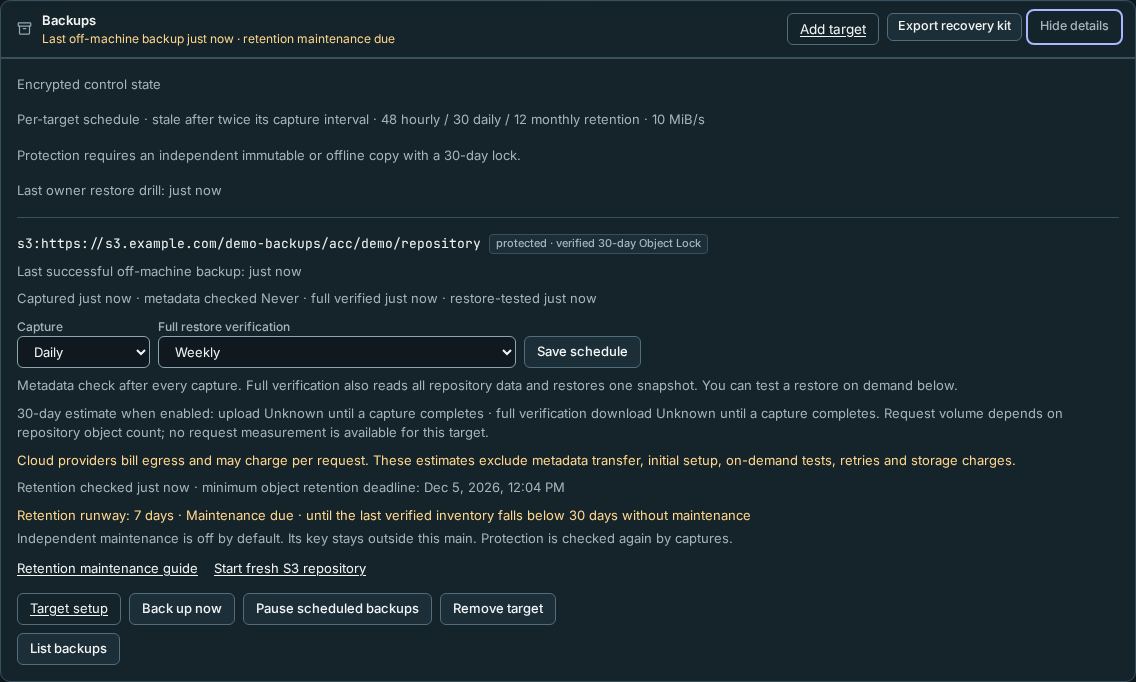
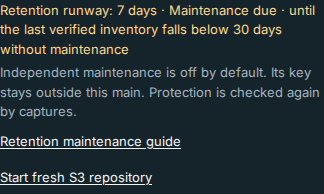
Host → Backups → Details shows Retention runway: days until the last version-bound inventory would have less than 30 days left without further maintenance. It is a projection, not a live provider check. Unknown/future-dated evidence is Unverified, and an expired window shows zero with a lapse message. At seven days or less, enabled targets show Maintenance due in Details and the compact status, and an Inbox warning. Independent maintenance has to run before the deadline even when captures are paused; the Details projection remains visible for paused targets. The warning resolves after a fresh inventory confirms more runway. The seven-day warning starts before the job’s below-35-day extension threshold (less than five days of runway): an early dry-run can correctly propose zero extensions. Keep the daily cadence running. Fresh capture/retention evidence within twice the selected capture interval and dated full-verification evidence are still separately required for protection.
Rotate to a fresh S3 repository
Use this when growth or the cost of repeatedly retaining old versions is too high. Rotation trades a new full upload and overlapping storage for a bounded old repository; it does not immediately free locked bytes.
- In Host → Backups → Details, select Start fresh S3 repository. Prepare a new target; Rynhult creates a new independent prefix and encryption key even if you use the same bucket. Configure a new prefix-scoped writer with no retention rights, keep the old target intact and run Check setup on the new target.
- Export a new recovery kit including both repositories. Retain the old kit and off-main snapshot/identity record until old recovery obligations end. Make a verified capture to the new target, test isolated restore, and enable its schedule before retiring the old schedule.
- Pause the old target, wait for its queued/running work, then revoke its writer at the provider. Stop all
retention-maintenance automation for its prefix and revoke its maintenance key or remove that prefix’s
s3:PutObjectRetentiongrant. Keep only independent read-only recovery access. Give the replacement job its own reviewed prefix scope. Leaving old extension authority usable would defeat the cost boundary. Record the latest retention deadline across every old version, including probes/locks and any versions with longer locks from other administrators. The maintenance plan's extension horizon is not that maximum. - Keep the old prefix, its kit, provider recovery access and records until all its retention deadlines have passed and your recovery/history/legal obligations permit retirement. Budget for both repositories during that overlap. Only an independent administrator may then check references and arrange provider version cleanup; this tool never deletes. Do not add lifecycle expiry to the active repository or delete chunks by age.
For recovery after losing the main, use the kit’s independent provider-account recovery instructions to issue a
read-only recovery identity. Export the ciphertext repository to a private local directory with provider tools.
If overwrites or delete markers hid objects, select their original retained versions first. Then run the offline
restore command above with --repository pointing to the export, and the independently recorded backup/snapshot IDs.
Recovery needs neither the old main, its vault nor its writer key. Test this export and isolated restore every quarter.
For a version-aware recovery export:
- Fence the old main and independently disable its writer key at the provider. Use your off-main drill record to select a known-good snapshot and a provider timestamp after its verified upload but before the incident.
- List all versions under the kit’s exact repository prefix. For each object key, select the latest object
version at or before that timestamp; ignore later overwrites and delete markers. Exclude transient
locks/. Keep the selected version IDs as an independent recovery inventory. - Download those explicit versions to private local scratch using trusted provider tools. Preserve only the
restic
config,keys/,data/,index/andsnapshots/structure. Refuse unexpected names, path traversal, symlinks or destinations outside that fresh export. Never run code supplied by the bucket. - Restore from that local ciphertext export using the kit, recorded backup ID and snapshot ID. Rynhult authenticates the signed manifest and complete payload before publishing quarantine. If validation fails, review the cutoff and retained versions; never bypass the identity, signature or hash checks to make a partial export work.
Version-aware export, retention extension and prune require qualification with your provider; no real cloud account was exercised by this implementation. Namespace-changing operations require independent fencing.
When you use browser Back or Forward between target setup pages, each target has its own check results. A newly prepared target needs its own Check setup; another target's success does not verify it. Credential drafts are cleared when you change targets or return to the new-target form.
While a target is being prepared, checked, or having its writer replaced, repeated submits are ignored until the request finishes. If setup fails because Rynhult cannot be reached, the form keeps the credentials so you can retry.
Backup age and planned downtime
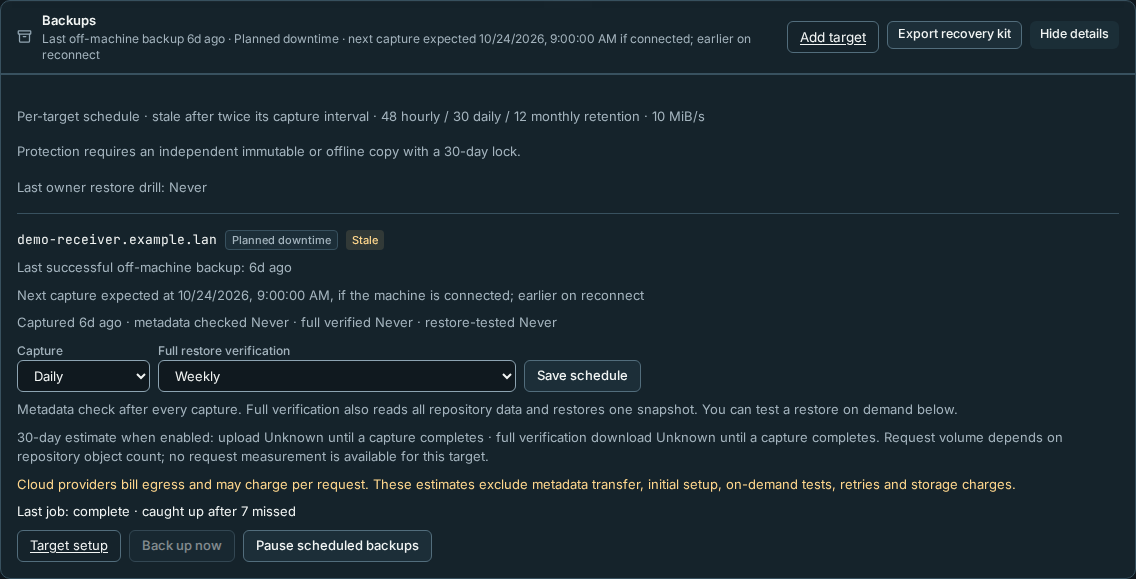
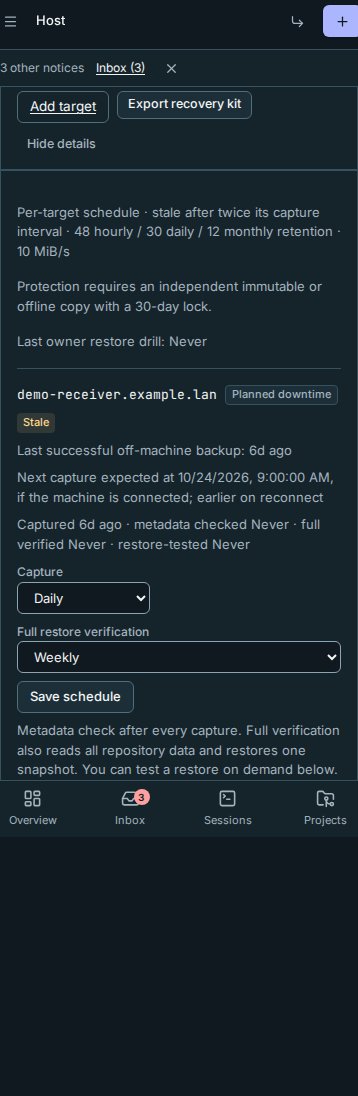
The Backups summary reports the last successful off-machine backup, keeping its true age visible during outages. During planned downtime, the summary also shows the conditional next capture time, or that capture waits for reconnect. A local backup is labelled separately and does not satisfy off-machine coverage. Open Details to see each target's last successful off-machine backup, capture, verification and restore-test times.
For a scheduled receiver shutdown, configure planned machine downtime under Host → Machines → Machine settings. During that machine's window:
- Planned downtime replaces the target's availability status. The last capture can still read Stale; planned downtime does not make old data fresh.
- Automatic scheduled captures and that target's failed/stale alerts pause. Other targets and the quarterly restore-drill reminder keep their usual behavior.
- Next capture expected at … gives the later of the window's end and the next capture due time, conditional on the machine being connected. Reconnecting earlier can start a catch-up capture. For Until it reconnects, the next capture is expected on reconnect, with no promised date. A disabled schedule instead reads Scheduled backups paused.
No downtime window or Until it reconnects policy is active by default. This policy affects the enrolled receiver's target, not local or S3 targets. The shorter Planned maintenance snooze suppresses machine-offline alerts only; use Planned Downtime for receiver capture/alert scheduling. Independent S3 retention maintenance must keep its own cadence even while scheduled captures are paused.
When an enabled target reconnects after missing one or more scheduled captures, Rynhult queues one capture immediately and resumes its selected cadence from that request. If the receiver returns after a scheduling check read its offline state, the next check queues the catch-up; the earlier check leaves no extra pending capture. The capture retains its missed-capture count and catch-up note. Targets whose machine was removed remain excluded without blocking other targets. It coalesces an already queued capture, and restart or repeated checks do not replay the same reconnect. Missed captures are counted from the pre-outage selected cadence, including failed attempts; they are not separate jobs to replay.
After success, List backups and the last-job result show caught up after N missed. A pending or failed catch-up does not advance the last-success time. A disabled target queues no catch-up. Back up now remains an explicit owner action during downtime; an unavailable receiver can still make that request fail.
If the machine stays off beyond the planned end, normal failed/stale alerts resume. Start the receiver and check its link or adjust its downtime policy; Rynhult cannot power it on. Planned downtime does not change append-only receiver permissions, retention or the need for an independent offline or immutable copy.
Receiver disk checks and safe setup commands
Mount dedicated storage before running the target commands. Never mount a
whole filesystem directly at /var/lib/acc-backup: its root-owned lost+found
can prevent the receiver's quota walk. For example, mount the volume at
/mnt/vault-volume, create its acc-backup subfolder and bind-mount that
subfolder at /var/lib/acc-backup. Make both mounts persistent, in that order,
and verify them after reboot before enabling scheduled backups. Keep the final
folder owned by acc-backup, mode 0700; do not change permissions on
lost+found to work around this check.
Copy target commands produces a child bash -euo pipefail heredoc.
A failed guard explains why setup stopped and what to review; it does not exit
your SSH login shell. For a recorded installation, save the complete copied
block as a private script on the target and run it with a log:
umask 077
# Save the reviewed copied block in receiver-setup.sh first.
sudo bash receiver-setup.sh > receiver-setup.log 2>&1
less receiver-setup.log
Keep the script and log private. Do not attach setup material to agent sessions. Setup writes the receiver binding only after the disk scan passed, so a refused disk leaves nothing bound: fix the mount and rerun the block. If a later step fails, the message says how to finish (start the receiver service). If a binding already exists, the block only refreshes the disk guard and the receiver's pre-start check without removing other pre-start checks, then stops; to replace setup, stop the receiver and save the binding and recovery kit first.
Setup scans entries as acc-backup, records the storage device and filesystem
ID in /etc/acc/backup-target.json, and installs a pre-start guard. Each receiver
start checks ownership, mode, identity, filesystem-root use and readability.
Check setup also checks the bound directory before opening the repository.
A mount replacement, wrong permissions or unreadable folder fails closed with
a disk-check message. Inspect journalctl -u acc-backup-receiver.service on the
target and fix the mount. After a reviewed volume change, or for a binding made
before disk checks (which now fails closed), record the disk as root and restart
the receiver; don't hand-edit identity values:
/usr/bin/python3 -I /usr/local/libexec/acc-backup-receiver-check --rerecord
systemctl restart acc-backup-receiver.service
On a receiver set up before disk checks, paste the current target commands once first: they install the guard, add the pre-start check to the receiver's unit (from its next start) and stop at the existing binding. Existing pre-start safety checks are kept; if the base unit already has the disk guard, it may run twice. Then run the two commands above. The pre-start check reads every repository entry; the unit allows 30 minutes for it after a reboot.
Busy captures, removed machines and deployment
When a backup action races an active capture lease, it returns A backup is
running; try again shortly. (HTTP 409). Wait and retry; the dashboard shows that
message directly. The short database snapshot barrier still uses HTTP 503 with
Retry-After on ordinary application routes.
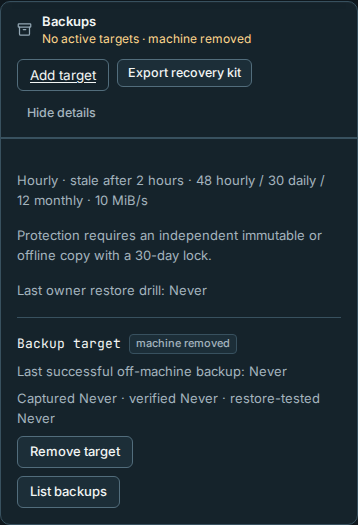
A target whose enrolled machine was revoked or removed shows machine removed. It is excluded from stale-backup warnings and has no enable/run actions. An owner can confirm Remove target once queued/running work finishes. This removes its active target configuration; capture results, job/audit history and recovery keys are kept. No ciphertext is deleted from the old machine. Keep the saved recovery kit for its historical backups.
Cloud (S3) targets also have Remove target in Host → Backups → Details. An owner can remove one after queued/running work finishes. The confirmation explains that data in the bucket stays until you delete it there, and Object Lock may keep it for the retention period. Local capture history, recovery keys and audit records are kept; removing the target makes no request to the bucket.
Read-only repository-lock metadata checks have a bounded deadline, including child cleanup. A stalled metadata reader is stopped without the lock-removal grace needed by backup commands; it does not hold a restic repository lock.
On shutdown, Rynhult sends SIGINT only to its own restic child, waits up to 65
seconds for lock cleanup, then force-stops and reaps only that child if necessary.
Repeated shutdown cancellation still waits for that cleanup. The server unit sends
its initial stop signal to accd only and allows 120 seconds before the final
service-group kill, leaving time for the owned restic cleanup. Before deploying,
deploy/install.sh --dry-run reports A backup capture is running and exits 75
while the staging/update lease is held; wait for that capture or update to finish.
Background scheduling, repository uploads and checks alone do not block this read-only plan.
The real install.sh runs the same preflight first; its update coordination and owned-child cleanup still apply.
The backup worker continues to serialize each whole scheduler pass, even when a busy pass takes a long time.
Without root, the dry run can't
read Rynhult's data folder: it says so and plans the aliases anyway. The probe
does not stop the capture. Existing stale-lock recovery remains available
if a crash or forced power loss interrupts cleanup.
Replacement activation candidate
Replacement activation is off by default. It is not automatic failover. It requires independent security review and an owner-run fenced replacement drill before production use. No setting in the dashboard turns it on. The controller never contacts a backup target, S3, DNS or a power controller, and never starts/stops services. These are operator instructions for a separately prepared replacement, not commands to run on the old main.
-
Independently power off or isolate the old main, prevent service restart, and block its access to machines, DNS and privileged helpers. Keep the evidence in an independent record. A DNS change, failed ping or local lock is insufficient. Preserve the fence until the old machine's control identity is wiped and re-enrolled.
-
On the replacement, install the matching trusted release and the
accaccount. Keep all Rynhult systemd services, sockets and timers stopped and masked, including brokers and package/update helpers. Prepare freshdata,catalog-localandgitdestinations under/srv/acc: the controller refuses existing trees and nonempty runtime/helper queues. Review TLS/private-CA escrow, stable origin, accounts/paths, credential exposure and post-snapshot revocations against independent records. No restored environment file or unit is installed. -
As the unprivileged recovery account, use the exported local ciphertext repository and the exact independently recorded snapshot. Preparation needs space for full validation and private scratch:
python -m acc.backup_server restore --kit /secure/example-kit.json \
  --repository /secure/exported-repository --target-id TARGET_ID \
  --backup-id BACKUP_ID --snapshot-id SNAPSHOT_ID \
  --destination /srv/acc/recovery/prepared --prepare-replacement
The administrator must first provision a private writable staging parent for that recovery account. This command never installs or activates anything. It prints the preparation-plan SHA-256 and replacement identity. Inspect the private
plan.json, capture age and exclusions before approving its hash. Do not edit the prepared files after approval. An extra trigger/schema object, changed hash, unsupported version or DB/key mismatch refuses preparation. Equivalent quoted/unquoted integer defaults on numeric columns are accepted to accommodate older migration histories. Column order, constraints and all other schema differences remain checked. Old kits remain necessary for historical backups; the replacement has a fresh backup signing/execution identity and no enabled targets, so create a new kit/verified backup after recovery. -
By default every restored machine is revoked and every session is held as archived. To retain a reviewed remote connection, supply
--reviewed-nodes /secure/reviewed-nodes.json, a private JSON object mapping its immutable enrollment ID to the independently verified SHA-256 fingerprint of its Ed25519 public key. To preapprove one remote conversation for a later fresh manual Resume, also supply--resume-session SESSION_ID. The node, account and original conversation must match. Local sessions can never be selected: their old workspaces/transcripts are not on this replacement. No selected session launches during activation. -
At the replacement's root console, create root-owned, non-writable-by-others mode-0644
/etc/acc-replacement.json. Use the exact plan hash and IDs from the reviewed plan. Its shape is:{ "enabled": false, "plan_sha256": "PLAN_SHA256", "installation_id": "INSTALLATION_ID", "backup_id": "BACKUP_ID", "old_main_id": "OLD_EXECUTION_MACHINE_ID", "new_main_id": "NEW_MAIN_ID", "release_control": false, "fence": { "kind": "power-off", "reference": "DRILL-123", "at": 0, "expires_at": 0, "restart_prevented": false, "nodes_dns_helpers_isolated": false }, "checks": { "authority_reviewed": false, "credentials_rotated": false, "endpoint_tls_reviewed": false, "accounts_paths_reviewed": false, "data_age_exclusions_accepted": false, "remote_work_inspected": false } }This example deliberately refuses activation. Replace placeholders with the exact hexadecimal IDs/hash and the timestamps with UTC Unix seconds.
kindispower-offorisolation;referenceidentifies the independent evidence, never a credential or sensitive path. Evidence must be current, not future-dated, and expire within one hour of its recorded time. Only after independently completing every check may root set the corresponding booleans andenabledto true. A checkbox is an attestation to completed work, not a fencing mechanism.credentials_rotatedis your attestation, and Rynhult relies on it. Preparation removes the API token and the GitHub/Cloudflare token files and disables OIDC and infrastructure credentials. It does not clear or disable the other credentials restored with the database and catalog:- model endpoint API keys (Providers → Model endpoints);
- MCP server values in the catalog;
- vault keys, whose grants are removed but whose values remain.
They are used again only when an owner deliberately resumes or launches work. Before setting
credentials_rotatedto true, rotate every one of them that the old main could have exposed at its provider, then update it on the replacement. -
From the trusted installed environment, the root console runs these separate steps:
/srv/acc/app/.venv/bin/python -I -m acc.backup_activation install
/srv/acc/app/.venv/bin/python -I -m acc.backup_activation activate
/srv/acc/app/.venv/bin/python -I -m acc.backup_activation status
The fixed source is
/srv/acc/recovery/prepared. Only allowlisted regular data files are copied to fresh fixed destinations, with private modes andaccownership. The controller never executes hooks, parses SQLite as root or installs source/configuration/units. It checks stopped/masked services, fencing and plan identity at every transition, writes root audit records and preserves the hold. Partial installation remains blocked; inspect it manually rather than deleting receipts or retrying an overwrite. Original data is never replaced. -
activateenters recovery, still returning quarantine HTTP 503 with no ordinary workers or WebSockets. Review the independent remote machine state and move the stable endpoint only with the fence maintained. When control may open, root explicitly setsrelease_controltrue and, with services still stopped/masked and current fencing evidence, runs:/srv/acc/app/.venv/bin/python -I -m acc.backup_activation release-control/etc/acc-replacement-state.jsonis the durable root receipt;/var/log/acc-replacement.jsonlrecords intents, completion/refusal and fencing references without secrets. Both parents must be trusted root-owned directories. Do not removedata/RESTORE-HOLD: the receipt, policy and replacement marker must agree. A disabled/malformed policy or changed marker blocks startup even if the hold is deleted. Restart using the restored SQLite data, catalog and git paths; PostgreSQL or mismatched paths refuse recovery startup. -
The operator may now deliberately enable/start the main using the trusted deployment procedure. Reviewed nodes may reconnect while restored workloads remain held. If a reconnected machine is still running a session the old main left running, the Inbox shows "A restored session is still running on machine". Rynhult does not adopt it, stop it or send it input, and its terminal opens read-only. Inspect it, then either:
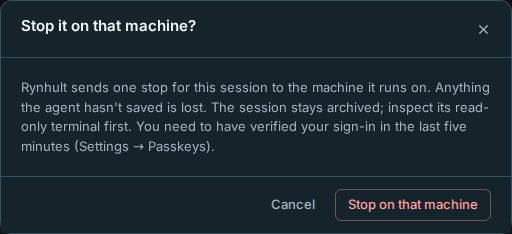
- Stop on that machine (owners only): verify your sign-in in Settings → Passkeys first; it works for five
minutes. Rynhult then sends one stop for that session through the machine's normal connection. The session
stays archived, the Inbox item resolves, and the audit log records
session.replacement_held_stop(also when it is refused). - Use a fresh Resume if you preselected that conversation. That exception is single-use, refuses revoked/changed identities, and its audit entry is marked as the replacement exception.
Re-enroll other machines deliberately. Publishing/tool approvals, grants, schedules, autostart, public routing, sign-in flows and backup jobs remain revoked, disabled or quarantined. The old installation API token does not work on the replacement: preparation removes it and the main makes a new one when it starts (
data/secrets/api_token; update any local scripts that used the old one). Preparation also removes the GitHub and legacy Cloudflare token files (github_token,cloudflare_token); if you use them, put rotated tokens back indata/secrets(acc, mode 0600) as at installation. Reapprove selected work and rotate exposed credentials; do not replay old helper queues. Record the outcome, new identity, first new verified backup and measured RPO/RTO in the off-main drill record. Recreating local conversations requires explicit separate recovery. - Stop on that machine (owners only): verify your sign-in in Settings → Passkeys first; it works for five
minutes. Rynhult then sends one stop for that session through the machine's normal connection. The session
stays archived, the Inbox item resolves, and the audit log records
-
Once
statusshowsactiveand the main runs, remove the prepared tree as the account that prepared it:rm -rf /srv/acc/recovery/prepared. It holds plaintext copies of the vault key, the new backup signing key and the restored database. Startup andstatusdon't read it; runninginstall,activateorrelease-controlagain afterwards refuses. Approved usage statistics from the old main are discarded and restored bug reports return to Settings → Usage and bug reports for review; deletions you requested still go.
Deleting scratch plaintext is not secure erasure; use encrypted scratch storage. This candidate has only temporary fixture qualification. A real root/systemd receiver, a replacement host, live provider IAM, external fencing and measured recovery time remain owner-operated gates.
New server captures validate the catalog overlay they actually contain, rather than requiring uncaptured built-in catalog bytes to stay identical during repository readback. Ordinary session activity and git pushes do not change this catalog check. Matching trusted Rynhult version/build, authenticated file hashes, valid catalog references and vault-key checks are still required. Older captures retain their original catalog-revision check; after upgrading, request a fresh capture rather than repeatedly uploading an old failed stage.
This page is generated from docs/wiki/User-Guide/Backups.md; the same page is under Guide inside Rynhult.