Connect an agent
What it's for: getting an agent CLI (Claude Code, Codex, GitHub Copilot CLI, Google Antigravity CLI, Cursor CLI, OpenCode) or the Ollama model server onto a machine, and signing it in, so sessions there can use it.
Where it can, Rynhult installs a CLI for you: open Providers, pick the machine with Machine, and select Install on the agent's tile (Ollama: under Other software). Where it can't, the same cards show numbered steps instead of a button. This page is those steps for every system.
| Machine | Rynhult installs | You install by hand |
|---|---|---|
| The main Rynhult, or a Linux machine | everything in the list | nothing (unless its helper is missing, see below) |
| A Windows PC (sessions run in WSL) | everything in the list | nothing (unless its helper is missing, see below) |
| A Mac | Codex and GitHub Copilot CLI (with Homebrew's npm) | Claude Code, Antigravity CLI, Cursor CLI, OpenCode, Ollama |
Before you start
- You're an owner (only owners install software).
- The machine is connected: its dot next to Machine on Providers is green. See Nodes.
- Know which account sessions run as on that machine: it's shown under Agent account at the top of Providers, for example
alex-agent. On a Mac, sessions run as the user who installed Rynhult there.
Steps
-
Open Providers and pick the machine with Machine.
-
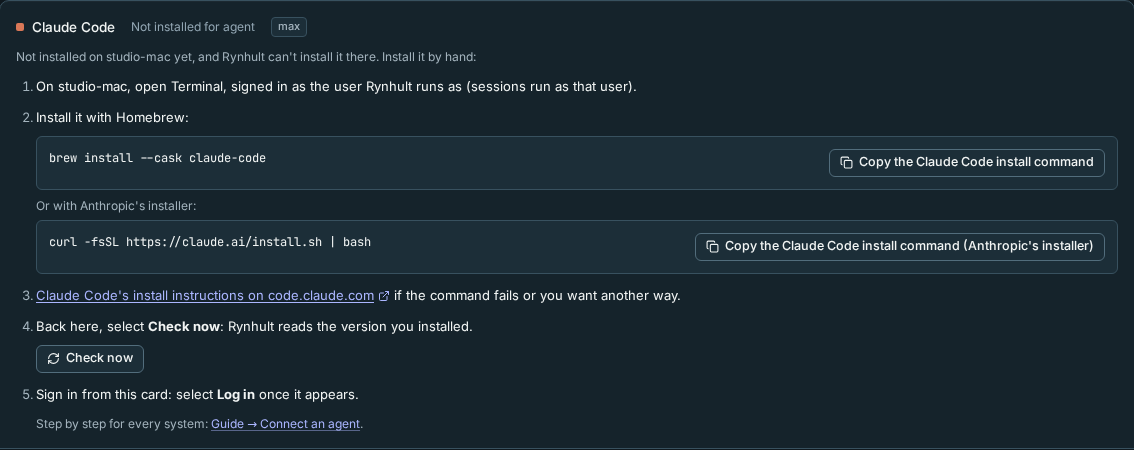
Find the agent's card. If Rynhult can't install it on that machine, the card says Not installed on machine yet, and Rynhult can't install it there and shows the steps. Ollama has no sign-in tile: its steps are under How to install Ollama on machine on the Other software card.
-
On that machine, open a terminal as the account sessions run as (step 1 on the card). By-hand installers run with that account’s permissions. Use a regular agent account, never a root shell. Rynhult omits the switch command if a machine reports an invalid or reserved account; ask its administrator to correct the account first.
-
Run the install command from the card (the copy button copies it). They are the providers' own commands, listed per system below, with a link to each provider's install page.
-
Back on Providers, select Check now in the steps. Rynhult reads the version you installed; the steps disappear and the Software line on the agent's card shows installed by hand.
-
Sign in from the agent's card: select Log in and follow it (the login runs on that machine). See Host and providers.
Mac
Open Terminal, signed in as the user Rynhult runs as. Homebrew comes first where the provider documents it.
Claude Code
Official instructions: code.claude.com.
brew install --cask claude-code
Or:
curl -fsSL https://claude.ai/install.sh | bash
Codex
Official instructions: developers.openai.com.
brew install --cask codex
Or:
curl -fsSL https://chatgpt.com/codex/install.sh | sh
GitHub Copilot CLI
Official instructions: docs.github.com.
brew install --cask copilot-cli
Or:
curl -fsSL https://gh.io/copilot-install | bash
Google Antigravity CLI
Official instructions: antigravity.google.
curl -fsSL https://antigravity.google/cli/install.sh | bash
Cursor CLI
Official instructions: cursor.com.
curl https://cursor.com/install -fsS | bash
OpenCode
Official instructions: opencode.ai.
brew install anomalyco/tap/opencode-v2
Or:
curl -fsSL https://opencode.ai/v2/install | bash
Ollama
Official instructions: ollama.com.
Download Ollama.dmg, drag it to Applications and open it once. Or use the command below.
curl -fsSL https://ollama.com/install.sh | sh
Codex and Copilot appear here only for a Mac without Homebrew's npm; with Homebrew Node.js, Rynhult installs them for you. To install Node.js:
brew install node
Linux
Rynhult's own helper installs everything on the main Rynhult and on Linux machines. You need these steps only if it says the helper isn't installed on that machine: update Rynhult there first (Updating a node), which brings the helper and the Install buttons back. Otherwise, open a terminal on the machine and switch to the agent account, using the example account below. Then choose the install command for your agent.
sudo -iu alex-agent
Claude Code
Official instructions: code.claude.com.
curl -fsSL https://claude.ai/install.sh | bash
Codex
Official instructions: developers.openai.com.
curl -fsSL https://chatgpt.com/codex/install.sh | sh
GitHub Copilot CLI
Official instructions: docs.github.com.
curl -fsSL https://gh.io/copilot-install | bash
Google Antigravity CLI
Official instructions: antigravity.google.
curl -fsSL https://antigravity.google/cli/install.sh | bash
Cursor CLI
Official instructions: cursor.com.
curl https://cursor.com/install -fsS | bash
OpenCode
Official instructions: opencode.ai.
curl -fsSL https://opencode.ai/v2/install | bash
Ollama
Official instructions: ollama.com.
curl -fsSL https://ollama.com/install.sh | sh
Installed this way, a CLI follows its vendor's own updates, not Rynhult's pinned versions.
Windows (WSL)
Sessions on a Windows PC run inside WSL (Ubuntu), so the CLIs go there, not into Windows: the providers' Windows installers put them where sessions can't see them. On the PC, open Ubuntu from the Start menu, switch to the agent account (the command below), and use the Linux commands.
sudo -iu alex-agent
What you should see
After Check now, the agent's card shows Log in instead of the steps, and its Software line shows the version with installed by hand. Once signed in, Status reads Logged in and New session offers the agent on that machine.
Troubleshooting
| What you see | What it means and what to do |
|---|---|
| Check now still shows the steps | Rynhult looks for the command where sessions find it (on a Mac: ~/.local/bin, /opt/homebrew/bin, /usr/local/bin). Open a new terminal as the same user and run the CLI's --version; if that fails, follow the provider's page to add it to your PATH. |
| machine refused a request: … can't be installed on a Mac from Rynhult | An older Rynhult offered a button the Mac refuses. Reload Providers: the card now shows the steps. |
| The install command fails | Use the provider's page linked in the steps: it lists other ways to install and fixes for common errors. |
| Ollama is installed but no agent uses it | Ollama has no sign-in: pull a model, then add it under Model endpoints on Providers (see Host and providers). |
This page is generated from docs/wiki/User-Guide/Connect-an-Agent.md; the same page is under Guide inside Rynhult.