Caddy Hardening
Phase 1 approved — 2026-10-23. This guide helps an operator check Rynhult's HTTPS edge. “Current” describes repository templates, not an inspection of your machine. Repository templates include the phase 1 sandbox, timeouts and bounded access logging. Applying repository changes to a running host remains an operator deployment step. This task did not alter the live service.
Before you start, have local-console recovery access, an owner account and permission to inspect the host. Use the actual Caddy executable selected by the inspection command below (apt or /usr/local/bin/caddy). Commands below are operator checks, not instructions already executed by Rynhult. Never paste expanded config, environment files, keys or raw journal output into sessions/artifacts. Use artificial hostnames such as rynhult.example.lan when sharing results.
systemctl cat caddy
Check the current deployment
-
Inspect the service and binary without printing its environment values:
systemctl cat caddy
systemctl show caddy -p User -p Group -p ExecStart -p ExecReload -p FragmentPath -p DropInPaths
/usr/local/bin/caddy version
/usr/local/bin/caddy list-modules --versions
sha256sum /usr/local/bin/caddy
Use
/usr/bin/caddyabove for apt installations. Compare the custom binary hash to your independently approved release record. Current setup requires a trusted binary and the Cloudflare module for wildcard mode; it downloads only with an independently approved checksum. Internal-CA mode uses apt Caddy. Do not use--environorsystemctl show -p Environment: those can reveal credentials. -
Check the listeners and account boundary:
sudo ss -lntup
sudo ss -lxnp
sudo stat -c '%U:%G %a %n' /run/caddy /run/caddy/admin.sock /run/accd.sock
id caddy
id acc
Current Rynhult config requires
admin unix//run/caddy/admin.sock|0660,/run/caddymode 0750 and accd on/run/accd.sock(acc:caddy 0660), with no accd TCP listener. The caddy account and root may control the admin socket; acc and agent accounts must not gain access through its group/ACLs. Checkgetfaclif ACLs are used. No TCP 2019 on loopback or the network: any local user could otherwise change Caddy. Keep the socket private even if HTTP admin endpoints seem harmless. The installer validates the exact admin address in adapted JSON before reload. -
Check credentials and certificate storage using metadata only:
sudo stat -c '%U:%G %a %n' /etc/caddy/cloudflare.env /srv/acc/data/secrets/cloudflare_token
sudo namei -l /var/lib/caddy/.local/share/caddy
sudo find /var/lib/caddy/.local/share/caddy -xdev -type f -perm /077 -print
Missing legacy token files are expected in internal-CA mode. Current Cloudflare file is root:root 0600; Publishing token is acc-owned 0600. Verify root-owned non-writable binary/config ancestors, Caddy-owned private storage (target directories 0700, private keys 0600), encrypted backups and no agent access. Investigate every permissive storage result; a public
root.crtis safe to distribute, its private CA key is not. Do not recursively chmod storage without classifying it. Confirm the data directory from the service's HOME/XDG settings if nonstandard. Protect the ACME account key as well as leaf and internal-CA keys. -
Check responses and TLS with a trusted client:
curl -sSI https://rynhult.example.lan/
openssl s_client -connect rynhult.example.lan:443 -servername rynhult.example.lan -tls1_2 </dev/null
openssl s_client -connect rynhult.example.lan:443 -servername rynhult.example.lan -tls1_3 -status </dev/null
openssl s_client -connect rynhult.example.lan:443 -servername rynhult.example.lan -tls1_1 </dev/null
For internal CA, use
curl --cacert /path/to/trusted-root.crtandopenssl ... -CAfile /path/to/trusted-root.crt. Expect TLS 1.2/1.3 to negotiate and old TLS to fail. A local OpenSSL policy can reject old TLS before connecting; that alone does not prove server rejection. Check verification result, hostname and expiry. Caddy's TLS defaults are maintained secure defaults; Rynhult sets no cipher list. Retain defaults instead of copying an aging cipher suite. OCSP stapling is automatic when supported by the issuer/certificate; “no response sent” alone is not failure (internal CA and issuers without OCSP are expected cases). Check expiry independently and do not require OCSP for every certificate.
What protects which requests
| Control | Current repository behavior | Operator check / proposal |
|---|---|---|
| HSTS | accd's frontend middleware sets max-age=31536000 when secure cookies are enabled. No includeSubDomains or preload. Rynhult Caddy templates set none. |
curl -I on dashboard and representative API/error responses; Caddy-generated 403/redirects need separate checks. Do not enable preload or includeSubDomains for shared/private zones without a separate decision. |
| Other response headers | accd sets nosniff, X-Frame-Options DENY, Referrer-Policy same-origin and CSP including frame-ancestors none. Preview gateway uses its own sandbox/frame policy. Caddy does not automatically add this application policy to published apps. | Inspect curl -I for dashboard/API/preview/published app separately. No general Permissions-Policy is configured. Proposed: qualify a dashboard-specific policy; never override preview/app CSP globally. |
| Access logs | Rynhult templates delete URI, request headers and response headers before access log serialization; Caddy defaults redact Cookie, Set-Cookie, Authorization and Proxy-Authorization unless log_credentials is enabled. All managed sites, including internal previews and standalone published sites, use the same restricted file logging policy. |
Inspect config locally for log_credentials, output/rotation and all site blocks. File access logs use /var/lib/caddy/acc-access.json, mode 0600, 10 MiB rolls, ten retained rolls and 14-day maximum retention. No body logging is enabled. The URI is omitted entirely, including query values. Runtime journald retention remains an operator host policy; the helper never forwards raw Caddy/provider output. Caddy log defaults do not sanitize arbitrary URL query secrets. |
| Request bodies | Dashboard 4 MB except /api/git/* (accd applies separate 2 GiB pack limit); previews 4 MB. Published apps have no generic Rynhult body limit. |
Proposed tests in an isolated deployment: over-limit dashboard/preview bodies return 413; normal git pushes still work. App-specific publish limits need explicit settings, not dashboard assumptions. |
| Rate limits | Application login and selected API/download limits exist; no general Caddy request-rate limiter is configured or assumed in core. | Proposed: firewall handshake/connection budget; for public device-gated Rynhult, start at 120 requests/minute/device, burst 60, with separate bounded downloads/upgrades per REMOTE-ACCESS. Qualify a reviewed limiter/application enforcement before claiming protection. |
| Timeouts | The global options import sets header read 10s and idle 2m; managed proxy transports set dial 5s. | Starting values: read-header 10s, idle 2m and proxy dial 5s; evaluate response-header 30s per route. Do not set a blanket body/write/stream deadline that breaks terminals, git or long downloads. Validate syntax against pinned Caddy; test slow headers, WebSockets/reconnect, git and large downloads. |
| ACME | Cloudflare wildcard uses DNS-01; no email or explicit CA endpoint is rendered by Rynhult. Internal mode uses tls internal, not ACME. |
Proposed Settings account email, staging/production CA selection and expiry/renewal status. Inspect config locally for issuer/email, confirm account registration and staging issuance before production. Never repeatedly force production issuance; ACME rate limits apply. |
For a redaction test, send synthetic canary Authorization/Cookie/X-Acc-Csrf headers and a synthetic query to a disposable test site, then check its logs locally. Queries and credential headers must be absent with the new templates. Do not send or search with actual provider tokens. Review journalctl -u caddy --since today locally for renewal/module errors and accidental output; share only sanitized categories. Runtime module errors and expanded configuration need redaction too. Vault redaction in accd does not sanitize Caddy's own journal.
Phase 1 systemd hardening profile
Current Rynhult drop-ins set RuntimeDirectory=caddy (0750), select the custom executable and credential EnvironmentFile in Cloudflare mode, and remove --environ there. The underlying distribution unit supplies the running user and any existing sandboxing. The installer now copies caddy.service.d-hardening.conf in both internal and Cloudflare modes. Caddy's service guidance recommends its official unit; inspect the effective unit rather than assuming distribution defaults.
The repository profile (verify on a disposable deployment before production rollout):
[Service]
User=caddy
Group=caddy
UMask=0077
NoNewPrivileges=yes
PrivateTmp=yes
PrivateDevices=yes
ProtectSystem=strict
ProtectHome=yes
ReadWritePaths=/var/lib/caddy /run/caddy
CapabilityBoundingSet=
CapabilityBoundingSet=CAP_NET_BIND_SERVICE
AmbientCapabilities=
AmbientCapabilities=CAP_NET_BIND_SERVICE
ProtectKernelTunables=yes
ProtectKernelModules=yes
ProtectKernelLogs=yes
ProtectControlGroups=yes
ProtectClock=yes
ProtectHostname=yes
ProtectProc=invisible
RestrictSUIDSGID=yes
RestrictRealtime=yes
RestrictNamespaces=yes
LockPersonality=yes
RestrictAddressFamilies=AF_UNIX AF_INET AF_INET6
SystemCallArchitectures=native
SystemCallFilter=@system-service
SystemCallErrorNumber=EPERM
LimitCORE=0
Capability settings merge with the distribution unit's, so the profile empties each list before setting it; a
distribution unit that grants CAP_NET_ADMIN no longer keeps it. Filtered system calls fail with EPERM instead of
ending Caddy. Core dumps are off because Caddy's environment holds the certificate credential.
The global options also set persist_config off. The wildcard template expands the certificate credential into
Caddy's loaded configuration, and Caddy would otherwise save that configuration, credential included, to
/var/lib/caddy/.config/caddy/autosave.json on every load. The installer removes an older autosave file as the
caddy user. Check whether one remains with:
sudo -u caddy test -e /var/lib/caddy/.config/caddy/autosave.json && echo present
Keep config/binaries read-only to caddy. Add a narrowly owned log directory only when file logs are explicitly chosen; journald needs none. DNS and ACME require outbound networking, so PrivateNetwork=yes is inappropriate. Test filesystem-based cloud credentials and resolver behavior in a disposable deployment, including the syscall filter. Do not copy the root Publishing helper's capability set into caddy.service. Neither accd nor agents get CAP_NET_BIND_SERVICE or Caddy admin privileges.
Verify the effective profile with:
systemctl show caddy -p UMask -p NoNewPrivileges -p ProtectSystem -p ProtectHome -p ReadWritePaths -p CapabilityBoundingSet -p AmbientCapabilities -p RestrictAddressFamilies
systemd-analyze security caddy.service
A score is diagnostic, not proof. In a disposable deployment, qualify service startup, DNS TXT cleanup, staging issuance/renewal, reload, reboot persistence, internal CA trust, Unix upstream, log rotation and rollback. Operators can validate the Caddyfile with the selected binary's validate --config /etc/caddy/Caddyfile --adapter caddyfile only in the correct credential context. Missing CF_API_TOKEN in an interactive shell is not evidence of broken service configuration; do not source or print the env file to diagnose it. Validation can provision modules and contact issuers, so it is a controlled deployment check, not a passive inspection command. Proposed portal helper performs it privately and reports sanitized results.
Firewall and remote access
Current templates allow LAN/private/tailnet/loopback sources, including containers, then proxy the dashboard/previews to accd. This is a network filter, not authentication of devices/users. Unknown names abort; non-private dashboard sources get 403. Private Publishing uses the same ranges; public project Publishing is separately owner-approved. Caddy automatic HTTPS can bind HTTP/HTTPS listeners, including UDP for HTTP/3; check actual listeners instead of assuming only TCP 443 exists.
Inspect the applicable firewall and the router's forwards, both IPv4 and IPv6. For nftables:
sudo nft list ruleset
Or, for UFW:
sudo ufw status verbose
Keep accd, brokers, dev ports and the admin API unreachable from untrusted networks. Allow outbound DNS/HTTPS for resolution, provider APIs and ACME; RFC 2136 requires access only to its approved update server. For private operation, restrict ingress to intended LAN/tailnet paths; DNS-01 needs no public inbound HTTP challenge.
The owner-approved REMOTE-ACCESS design is not enabled: the owner controls under Settings → Remote access exist, but this release installs no apply helper and public access stays off. A provider token or public DNS record does not authorize opening Rynhult. Its future public mode requires a separate public hostname with mandatory device mTLS before Rynhult code, explicit owner exposure confirmation, private recovery, revocation of live streams and outside-network negative tests. TCP 443 is the approved direct-edge direction; port 80 must never proxy/show Rynhult and public HTTP/3 is initially disabled. No-cert/wrong-CA/expired/revoked devices must fail before Rynhult responds. Test SNI/Host confusion and IPv6 too. An HTTP 403 from today's private template is not that device gate. Do not weaken the filter or terminate TLS at a DNS provider to make a test pass.
Portal workflow and troubleshooting
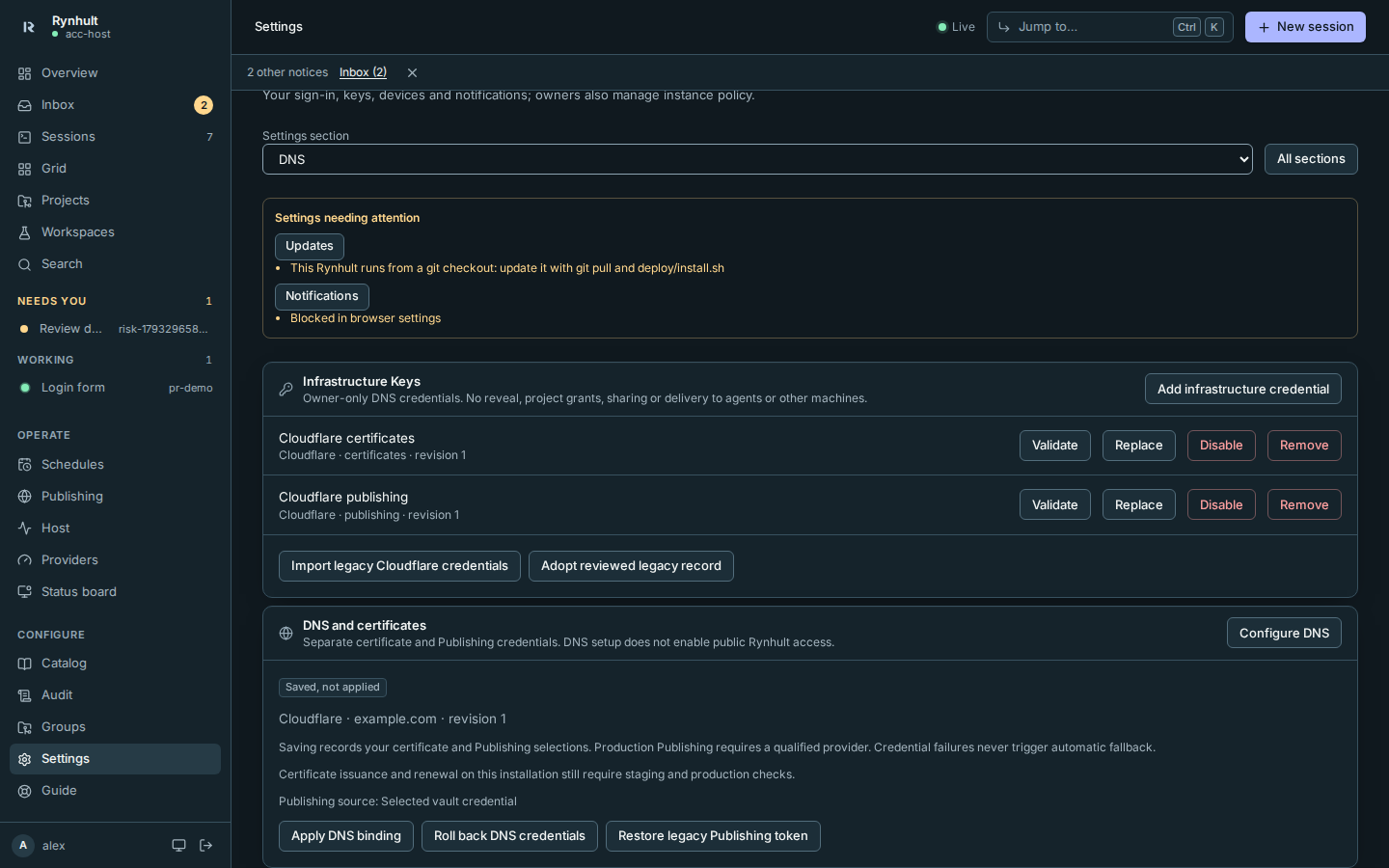
The owner-only Infrastructure Keys and DNS settings controls are available. Initial root deployment and release qualification remain operator steps:
- Leave the installer's Cloudflare DNS zone question blank to use Caddy's internal certificates, or open Settings → DNS (DNS and certificates) after owner creation. Trust the internal root on your device before entering secrets. No provider is required to use Rynhult privately; Publishing requires a configured zone.
- In Settings → DNS → Infrastructure Keys, select Add infrastructure credential and use the provider's fixed field form. Only owners can see/manage these entries; they cannot be given to projects. The common-variable dropdown for project keys is a separate feature.
- In Settings → DNS and certificates, confirm the provider and zone, select separate certificate/Publishing credentials, save, then Apply DNS binding. Expect distinct saved/validated/applied states plus certificate health. DNS setup does not enable remote access.
- Rotate by staging a replacement, testing issuance/record cleanup, applying and checking renewal health, then revoking the old token at the provider. A controlled restart may interrupt streams; saving a new value alone does not update a running Caddy process.
If DNS validation fails, check delegation/propagation, expiry, selected zone and minimal API permissions. If apply fails, retain last-good config and show failure; never mark it applied or print a raw provider response. If the vault key is missing after restore, restore the matching secrets backup; do not create a replacement key over existing ciphertext. Internal-CA browser warnings mean the client lacks server trust, not that TLS should be disabled. Use console/LAN recovery when certificates or DNS are unavailable.
See Keys, Publishing and Security for current behavior. Decision 0010 records owner approval. The DNS design contains release gates; the pending manifest prevents deployment of an unqualified binary.
Operator cutover and recovery
The repository includes an inactive helper installer (deploy/dns/install.sh), fixed socket/service units, a
root policy, a pinned CI build manifest and an offline checksum-enforcing binary installer. No compiler runs on a
destination. The manifest has no approved artifact hashes yet; do not change its status without independent review
of CI provenance, dependency lock/SBOM, architecture/module checks and staging/production evidence.
Deploy only from a reviewed checkout. The helper needs root-owned non-writable ancestors, root:root 0700
/etc/caddy/acc-dns, root:root 0600 credential generations and /etc/acc-dns/{policy,release}.json.
/run/acc-dns is root:acc 0750; its socket is root:acc 0660 and checks the kernel peer UID. It accepts only fixed
Fixed registered provider actions and locally allowed zones. New providers also require explicit local policy approval and live qualification. No caller can select a path, endpoint, module, binary or service.
Import first, then save the approved zone binding. Before first apply, the operator prepares the supplied managed EnvironmentFile drop-in: its optional legacy fallback supports recovery, while managed credentials take precedence. Qualify the candidate binary, validate/apply privately, verify staging issuance/TXT cleanup and production health, then run the operator's controlled persistence/reboot check. Keep the legacy root-owned file for 24 hours after successful cutover. The helper retains its previous generation for 24 hours, refuses expired rollback and offers purge. Legacy-file deletion and token revocation are explicit operator tasks after that window; old backups also need a retention decision. Publishing now consumes its selected vault credential; its legacy DNS-record file stays until the owner confirms tested cutover. See DNS providers for explicit source rollback and legacy ownership adoption. Installer and Publishing Caddy validation already prefer the managed certificate generation, so they do not revert a rotation.
A pending generation after a crash requires recovery before another apply. A failed reload restores the previous persisted and running credentials and keeps the existing rollback generation; the refused candidate is deleted. If that restoration also fails, the helper reports recovery required. Rollback is one step: afterwards the abandoned credential's root copy is deleted, and another rollback is refused until the next apply.
DNS apply and Publishing share /run/acc-dns/caddy-config.lock, created at boot by the helper's tmpfiles entry.
Publishing waits up to 60 seconds for it and bounds its own Caddy validate and reload to 60 seconds each. If the lock
is busy or unavailable, the Publishing request is refused with nothing changed; submit it again. A successful
reload still leaves issuance unverified. No production service, ACME request, reboot or external-network test
was performed by this change.
This page is generated from docs/wiki/User-Guide/Caddy-Hardening.md; the same page is under Guide inside Rynhult.