Guardrails
Screenshots use fictional demo accounts and fixed example metrics, not live systems or qualification evidence.
Guardrails stop an agent's tools from doing a few risky things: force pushes, pushes to main or master, merging pull requests, recursive deletes outside the workspace and reading secrets. Tool installation and changes also need approval by default. They apply in every permission mode, including "skip permissions", "yolo" and autopilot.
They are a safety net against mistakes and casual prompt injection. They are not a sandbox. An agent runs in its own Linux account, and a determined agent can still do anything that account may do, for example by writing a script and running it. The real protection is elsewhere: branch protection on GitHub (or your git server), separate Linux accounts for agents, and backups. Turn on branch protection for main in every repository agents push to.
Containers per session are a Preview: off by default, switched on per project by an owner, and only on a host that has passed the container qualification (Sessions in containers). They keep guard and hook files immutable inside the container, but until full support they are a test, not isolation to rely on. Containers complement guardrails and backups; they don't replace them.
How well they work depends on the agent:
- Claude Code and Codex call the guard before every tool. Rynhult records trust for its exact Codex hooks on reviewed CLI versions (see below); hooks awaiting review do not run.
- GitHub Copilot CLI support is a preview that hasn't been tested against a real Copilot account yet. In a folder Copilot trusts, a repository's
.github/copilot/settings.jsonorsettings.local.json, or its Claude settings (.claude/settings.jsonorsettings.local.json), can switch off Copilot's hooks, the guard included, so Rynhult won't start Copilot where the session's folder, or a folder above it, has such a file. It also won't start Copilot in a repository whose git settings move its working folder elsewhere (core.worktree), including Git config files saved with a UTF-8 byte-order mark, because Copilot would then read those files from that other folder. That meansdisableAllHooksset to anything butfalse, a non-emptydisabledHooks, another hook setting, or a file Rynhult can't read as plain JSON. This applies to new sessions, resumes and restarts alike. The session then shows Recovery needed (under Needs you) with the file and the setting, the Inbox gets an item, and the audit log recordssession.copilot_hooks_refused. Remove that setting (or fix the file), then resume the session, or start a new one if it never started. - Cursor's hooks are reported not to fire reliably on Linux.
- Antigravity calls the guard like Claude Code does.
- OpenCode calls the guard through Rynhult's plugin before every tool, including the tool calls it chains in Code Mode and MCP tools. A call the guard can't check is refused. A repository's own OpenCode settings can't switch the plugin off, and an agent can't add plugins or custom tools to the project (
.opencode/plugins/,.opencode/tools/, or plugins and policies inopencode.json); its other OpenCode settings stay editable. If a future OpenCode version couldn't load the plugin, its shell commands are refused (they only run once Rynhult's plugin has checked them). The session would also never report starting, so Rynhult shows it as hasn't started in the Inbox instead of as healthy.
When a guardrail blocks a step, the agent is refused with the reason (for example "recursive delete outside the workspace (../build) is blocked by Rynhult's guardrails") and carries on with something else. You see it three ways:
- the session's doing now line shows Blocked 4m ago: … for that step (amber, with a shield; the age is how long ago it happened). It is a note about that step, not a new status: the session stays Working and the note clears at its next step;
- the Inbox gets one item per session and rule, "<session>: guardrail blocked …", with the reason (only the session's owner and owners see it);
- the session's Activity tab records a
guardrail_blockedevent.
Private Development workspaces
Development workspaces always carry an additional local-only rule. It refuses every git push (including branch pushes, explicit URLs and subtree pushes) and the lower-level git send-pack and git http-push, git remote add, git remote set-url, git config changes to a remote's address, gh repo create and gh repo fork, and gh api calls that write. Commands run through git submodule foreach are checked like any other. It uses the same shell parser for wrapped commands, nested shells and command substitutions. Command-line git aliases and dynamic git actions that cannot be checked are refused conservatively. Printed command text and local commits remain allowed.
This rule is mandatory for Development sessions even if the owner disables all optional rules in Settings. Agents also receive local-only instructions. Rynhult's internal git backup runs through the broker, adds no remote and is allowed. To add a repository, use the separate Promote to project action; existing sessions retain their local-only rule, while new project sessions use ordinary project rules. An owner converting a Research / Council workspace must stop its sessions first and start new ones after conversion.
The rules
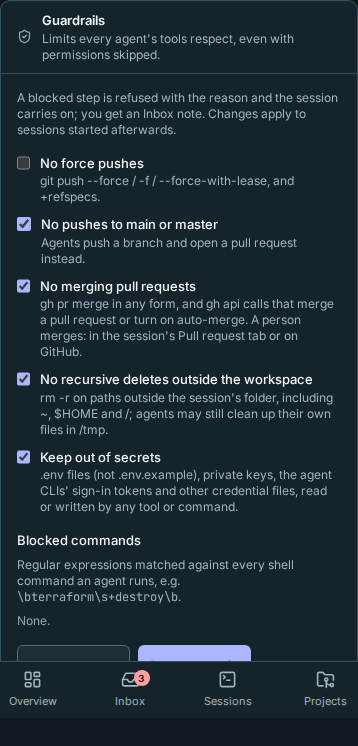
Owners choose them under Settings → Guardrails; everyone else can see them there. All five are on by default: they only stop things Rynhult's own workflow never needs (agents push a branch and open a pull request; a person merges it).
Edits are a draft until you select Save guardrails. Unsaved changes stays visible beside the button; Guardrails saved confirms a successful save. These safety settings never autosave. A failed save shows an error and keeps your draft.
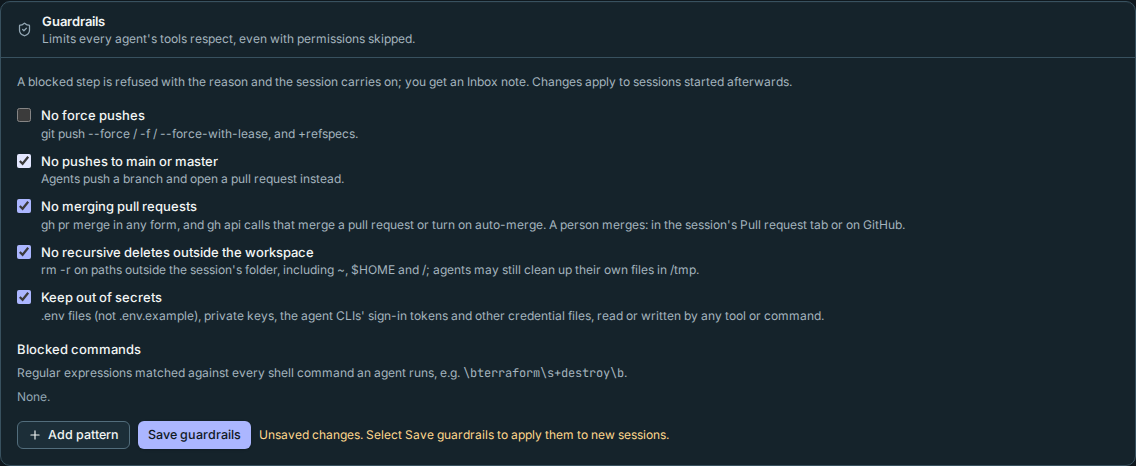
| Rule | Blocks |
|---|---|
| No force pushes | git push --force, -f, --force-with-lease, and +branch refspecs. |
| No pushes to main or master | git push origin main, HEAD:master, --all/--mirror, and a plain git push while main or master is checked out. |
| No merging pull requests | gh pr merge in any form, including --auto, -R/--repo anywhere, wrappers and nested shells, and gh aliases that expand to it (read from the agent's gh config, including ! shell aliases); creating such an alias with gh alias set, and gh alias import (it can't be checked). gh api calls that merge: a non-GET request to repos/<owner>/<repo>/pulls/<n>/merge, and GraphQL mergePullRequest or enablePullRequestAutoMerge, whether inline, from a heredoc or from a readable file. gh pr $ACTION, gh $SUB … and a GraphQL query Rynhult can't read (a variable, unseen stdin, a missing file) are refused conservatively. Reading is allowed: gh pr view, checks, create, ready, review, list, and gh api repos/…/pulls/<n>/merge (a GET only asks whether it was merged). A person still merges, with Merge in the session's Pull request tab (Rynhult does that itself, not the agent's shell) or on GitHub. |
| No recursive deletes outside the workspace | rm -r/rm -rf on anything outside the session's folder, or the folder itself: /, ~, $HOME, ../…, other absolute paths, and paths only known when the command runs ($(…), a variable it didn't set itself). Agents may clean up their own temporary files: a delete in /tmp or /var/tmp is allowed when everything it would remove belongs to the agent's account, including through a variable set earlier in the same command (S=$(mktemp -d); …; rm -rf "$S"). rm -rf * inside the folder is allowed too. |
| Keep out of secrets | Reading or writing .env files (not .env.example/.sample/.template), the session's own session.env (where its keys are) and MCP settings, private keys (id_ed25519, *.pem), ~/.ssh, ~/.aws, ~/.config/gh, ~/.kube, ~/.docker, .netrc, .git-credentials and the agent CLIs' own sign-in files (and OpenCode's database, which holds its saved keys; opencode auth export too), including through a file name pattern that could match one (.en?). Also gh auth token, printenv or env on their own (they print every key), and other processes' /proc/…/environ. This prevents accidents: it covers the file tools, search tools and shell commands Rynhult knows about, not every way a program could read a file. Using a key's variable in a command ($OPENAI_API_KEY) is allowed. |
Blocked commands adds your own rules: a regular expression and the reason the agent is given. It is matched against the command as written and against each command's words as the shell reads them, with quotes removed, so ter""raform destroy counts as terraform destroy. For example \bterraform\s+destroy\b with "no destroying infrastructure from an agent".
Changes apply to sessions started afterwards. Each session keeps the rules it started with (they're in its Setup as guardrails.json), so a running session isn't changed underneath you.
An agent can't change its own rules through its tools: the guard refuses to change the session's rules or any agent's hook settings. If the rules file is changed or removed anyway, every step the agent tries is blocked with "this session's guardrails … are missing or were changed after launch". Restart the session from Rynhult to put them back.
How it works
Every agent CLI calls a hook before each tool runs. Rynhult points that hook at acc-guard, which checks the step against the session's rules and answers in that CLI's own format. The same hook feeds the doing now line.
Shell commands are read the way a shell reads them, without running anything:
- What runs. Every command in a list, pipeline, subshell
( … )or group{ …; }is checked, as are command substitutions$(…)and backticks (also inside double quotes, never inside single quotes), process substitutions<(…), the script ofsh -c/bash -c/zsh -c,eval, and a heredoc, here-string orecho …piped into a shell. Commands whose names come from a variable or substitution are treated as unknown: push-like and recursive-delete arguments are checked conservatively. Wrappers are looked through with their options:sudo -u builder,env -i/env -u NAME/VAR=value,command -p,time -p,nice -n 10,nohup,exec,stdbuf,timeout 30s,xargs,busybox,flock,script -candsu -c. Commands passed tofind -exec/-okare checked too;-execdir/-okdiruse an unknown directory. - What is only text. Quoted text, comments (to the end of the line), a heredoc read by
cat,echo/printfarguments andgrep/rgsearch patterns are not commands or files:echo 'git push -f',grep -F '.env' README.mdandcat <<'EOF' … EOFare allowed. Quoting a real operand doesn't hide it:cat '.env'is still blocked. - Where it runs.
cdis followed through the command, socd /opt && rm -rf oldis caught. Acdinside( … ),$(…)or a pipeline doesn't carry over, and acdto somewhere only known at run time (cd "$DIR") counts as outside the workspace.git -C dir,-Cdir, repeated-C,sudo -Dandenv -Care followed too. The tool's own working-directory argument (workdir,Cwdorcwd) sets the starting folder. Relative paths,.and..are resolved from there before the rules look at them. - Options and pushes. Unambiguous long-option abbreviations for
git pushandrmcount just like the full option (--force-w,--mirro,--rec).git subtree pushchecks the target branch too. Git invocations that define a command-line alias (-c alias.…or--config-env=alias.…) are refused conservatively when a built-in rule is enabled. Saved git aliases are not read.--repo=…,tag v1and--tags-only pushes (not a branch push), the matching refspec:and wildcards such asrefs/heads/*(could include main) are understood. A branch only known at run time (git push origin $BRANCH) counts as possibly main;"$(git branch --show-current)"is read as the current branch. - Secrets. Input redirections (
< .env), file options (grep --file=.env) and the operands of other commands count as access; filters such as--exclude=.envdon't.
They read the command's text, so they can't see what only exists when it runs: a script file's contents (bash deploy.sh), a program that calls GitHub's API itself (curl with a token, a Python script), what a variable or xargs input holds (a variable counts only when the same command set it plainly, S=/tmp/x or S=$(mktemp -d); otherwise the rules assume the worst, and find … | xargs rm -rf is refused because the paths come from xargs's input), saved git aliases and push.default settings, symbolic links that lead out of the workspace, or a program that deletes or reads files itself. Very deeply nested or unusual syntax (case patterns inside $(…), extended globs) may be read approximately, a command nested too deeply to check, or one that takes too long to check (more than a few seconds), is refused (split it up), and one the checker fails on is refused too and noted in the session's Activity, so an unusual command can never switch the checks off. They exist to stop the common accidents, on top of each CLI's own permissions and sandbox.
Tools on approval
Use installed tools freely. Running a command, checking a version, searching a package registry, or building a project does not need tool approval. Project-local dependencies are allowed: npm install inside the session workspace, a project virtualenv, uv sync and cargo build.
Installing, upgrading or removing an account or machine tool does need approval. The parsed command identifies system managers (apt, dpkg, snap, flatpak), global npm/pnpm/yarn changes (including npm link of the project and npm's own npm_config_global/npm_config_prefix settings), pip outside a project virtualenv, pipx, uv tools, cargo/go/gem installs, Homebrew, global bun and deno installs, corepack enable and volta install. It also checks installer downloads piped into shells and writes or permission changes in common executable folders such as ~/.local/bin, including unpacking or copying into them (tar -C, unzip -d, rsync, dd of=). Wrappers such as sudo, env, timeout and nested shells do not hide the change. Version managers that keep runtimes in their own folders (nvm, asdf, mise, rustup, conda) are not checked. A destination that cannot be proved project-local is not treated as local.
When refused, the agent asks:
rynhult-request tool --manager pipx --name black --version 25.1.0 --reason "Format the demo project's Python"
Names must be registry package names, and versions must be exact. Requests never accept URLs, scripts, downloaded packages, paths or shell commands. For a downloaded .deb or installer script, request the equivalent registry package or ask an owner to handle it outside Rynhult. Managers must already be installed on that machine. A manager's own refusal (for example, Python refusing a user install) is shown as a failed request; pipx or uv tools are usually better for Python command-line tools.
Approval trusts the package's code, including its install hooks. Account package hooks run as that agent account; system package hooks can run as root. Review the package and destination, not just the reason.
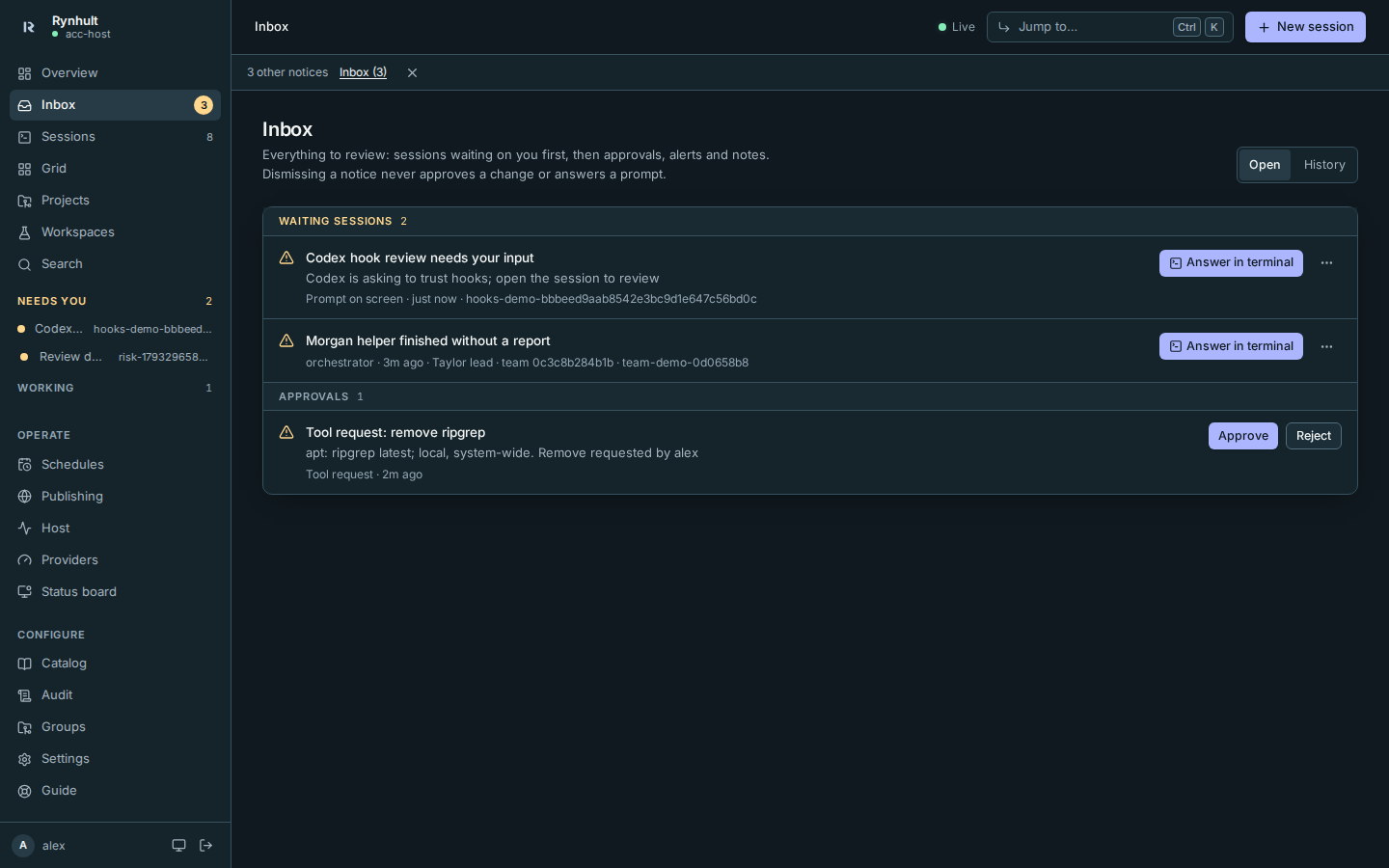
- Open Inbox and review the package, version, machine, destination and reason.
- Choose Approve or Reject. Members can approve their own account's requests. Only owners can request or approve system-wide changes.
- Open Providers → Tools to see the installed version and request history. Remove asks for another approved change.
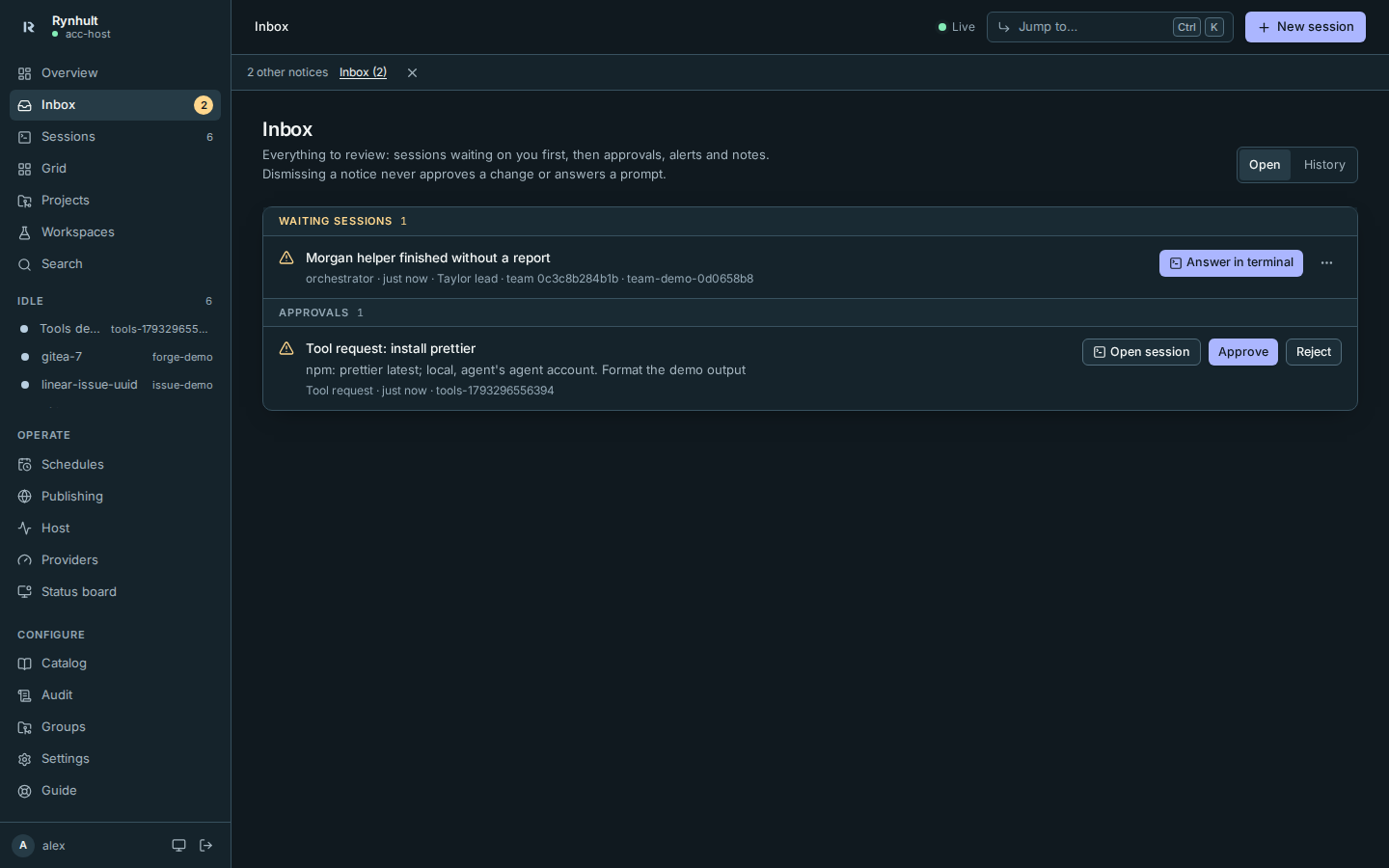
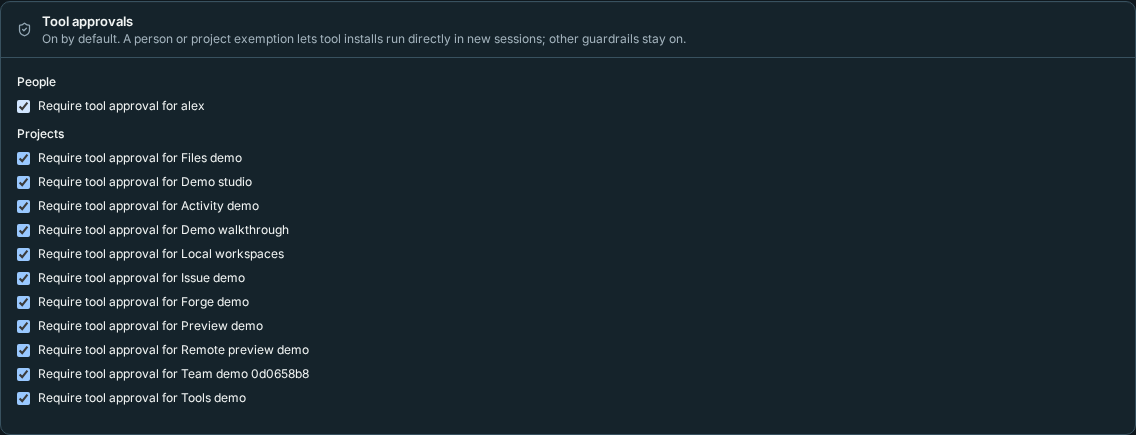
Owners can change Settings → Tool approvals per person or project. Turning approval off for either a person or a project lets direct installs run in new sessions; other guardrails are unchanged. Existing sessions keep their launch policy. This does not grant a member root privileges. Direct installs made with approval off are not added to Rynhult's Tools inventory.
Codex hook review
Rynhult installs and records trust for its own exact hook definitions on Codex 0.163.0 and 0.164.0, including on a fresh machine. Hooks you add, and modified groups containing Rynhult commands, still require Codex review. Rynhult preserves your other settings and never enables hooks you explicitly disabled.
A repository's own Codex settings can't switch hooks off: Rynhult starts Codex with hooks turned on, so a project
.codex/config.toml with [features] hooks = false doesn't stop the guard. This also overrides turning Codex hooks
off as a whole in your own Codex settings; to keep one of your own hooks off, disable that hook instead.
If Codex shows Hooks need review, Rynhult marks the session Needs you. Its Inbox item says “Codex is asking to trust hooks; open the session to review”. Open the session, choose Review hooks, and inspect each definition before trusting it. Unknown Codex versions or config layouts retain this step; Rynhult leaves trust unchanged when it cannot safely record it. Until a hook is trusted, Codex does not run it.
Orchestrator teams
Every Orchestrator team member has mandatory protected-branch rules, even if the normal instance rule is off. Team members cannot merge, pull or push into main/master, switch to or rewrite those branches (including git fetch into them), directly update git refs, or merge a pull request (gh pr merge, or the same through gh api, which also may not move branches or write files on GitHub). Helpers merge into their parents' topic branches; you merge the lead's pull request. Ordinary sessions retain their existing guardrail choices.
For No merging pull requests, API endpoint variants and JSON-escaped GraphQL mutations receive the same checks
as ordinary merge commands. A write with an unresolved endpoint, or an alias using a command-local GitHub CLI
configuration, is refused because Rynhult cannot check its destination. Saved GitHub CLI aliases are decoded only when their YAML spelling is understood; block/flow mappings, values continued on a further line, unsupported escapes, unreadable files and oversized alias files refuse alias execution. Plain aliases created with gh alias set stay usable. A gh alias or extension (including co, and names such as copilot that older gh versions don't have as commands) is checked only when it is the whole command: next to other commands, or with a $(…) in its words, it is refused, because those could rewrite its definition before gh reads it. Run it as a command of its own. The agent can spell out a harmless endpoint or
command; merging still belongs to the person.
Commands the guard cannot verify
If a command name comes from a variable (for example, $PS -NoProfile ...), a refusal can say
“command name comes from a variable; cannot verify”. This means the guard cannot prove which program will run;
it does not mean the command contains a recursive delete. Spell out the executable path to make its identity clear.
The guard retains the existing refusal rules for dynamic commands.
For powershell, powershell.exe, pwsh and pwsh.exe invocations, the guard understands a small subset. This
also applies when the name was assigned earlier in the same command (PS=powershell.exe; $PS …), and when an unknown
program is given switches only PowerShell takes (-Command, -EncodedCommand, -NoProfile, -File and the like).
The subset is:
-Command followed by literal Rust toolchain queries (rustup toolchain list, rustup target list --installed,
cargo --version, rustc --version, including explicit +toolchain selections and semicolon-separated queries).
-NoProfile is required, because without it PowerShell first runs the user's profile script.
-NonInteractive and -NoLogo are optional. Other PowerShell input, including
Remove-Item -Recurse, script files, encoded commands and variable scripts, is refused when shell guardrails
are enabled because the guard cannot verify it. PowerShell source is never interpreted as POSIX shell source.
Windows cmd. Through WSL interop, cmd.exe /c … runs with the Windows user's rights, in cmd's own grammar.
Simple queries such as cmd.exe /c echo %USERPROFILE% or cmd.exe /c ver are allowed. The following are refused
when shell guardrails are enabled:
- deletes (
rd,rmdir,del,erase,robocopy); - other programs and shells (
powershell,cmd,call,start,git); - syntax that can hide a word (
^,!,%~,%VAR:~…%); - cmd reading its commands from stdin.
Unknown programs given a script. A program whose name the guard can't know ($SHELL -c '…') might be a shell, so
its -c script is checked as one.
find. find -delete is refused when a starting point is outside the workspace (find /opt -name x -delete).
-exec/-ok commands are checked with {} standing for a path under each starting point, so
find / -name node_modules -exec rm -rf {} + is refused, while the same inside the workspace is allowed.
xargs. A recursive rm run through xargs (find … | xargs rm -rf, xargs -0 rm -r < list) is refused,
because its paths come from xargs's input, which the guard can't see. To clean up inside the workspace, use
find … -delete or name the paths. A non-recursive xargs rm -f is not affected.
Aliases. Claude Code runs commands with alias expansion on, so an alias defined on one line of a command applies
to the lines after it. Codex, Copilot and OpenCode run each command in a new shell with alias expansion off, and keep
no aliases between commands. Any shell can also turn alias expansion on itself (shopt -s expand_aliases). An alias defined
in the command is therefore followed wherever it is used: after alias r='rm -rf', r /opt/example is checked as
rm -rf /opt/example. An alias the guard can't read word by word is refused when it is used: one with ; or &&,
one from a variable, or one ending in a space, which expands the next word too. Aliases from the account's shell
startup files are not known to the guard.
This page is generated from docs/wiki/User-Guide/Guardrails.md; the same page is under Guide inside Rynhult.