Install on a Mac
v1.0: the macOS node remains supported as an additional machine for the Linux server. You use the dashboard in your Mac's browser. The macOS standalone desktop app is separate, post-v1 work, with only one native platform delivered at a time, in an order not chosen yet. See v1.0 platform scope.
The separate desktop-app work has a Linux standalone developer slice and an unqualified Mac port. It is not available in this node installer.
What it's for: making a Mac an additional machine of a Rynhult you already run, so that Rynhult can start sessions on it. The Mac installer (Rynhult-<version>.pkg) installs Rynhult and opens Rynhult Setup, which asks for one command from your Rynhult and does the rest.
This installer cannot make a Mac the main Rynhult: the installed server still needs Linux/systemd, including Windows through WSL2. The separate Mac standalone port is not a qualified replacement. Install the main Rynhult on a Linux server first; the existing Windows main setup also runs Linux inside WSL.
Installer availability: Windows and Mac release installers are built only for
v1.0.0 and later tags. Pre-v1 builds and release candidates (server builds) have no package download. The package steps
below apply only when Host → Machines → Add machine → Mac offers one.
Administrators using reviewed source can follow Install → By hand.
An already enrolled Mac updates from its row in Host → Machines. When no
installer is available, Host shows a command to update from this main's source;
do not remove or enroll it again.
See Update an older machine.
The prepared standalone desktop .app/.dmg is a separate, unreleased spike,
not this node package.
Before you start
- A main Rynhult that this Mac can reach over HTTPS, for example at
https://rynhult.example.com, and an owner account on it (only owners can add machines). - macOS 13 or newer, on Apple silicon or Intel.
- Homebrew. Rynhult uses it to install Python, tmux, git and uv. If it's missing, Rynhult Setup says so and opens brew.sh for you: copy the one command shown there into Terminal, follow it, then open Rynhult Setup again.
- Node.js 22 or newer for agents installed with npm. Install it with:
brew install node - Sign in to the Mac as the user Rynhult should run as. Sessions run as that user: agents can read that user's files, and the node's own key and settings. If that's too much, create a separate macOS user for Rynhult (System Settings → Users & Groups), sign in as that user, and install there.
Before v1.0 there is no Rynhult-<version>.pkg: follow Before v1.0: no package instead of the steps below.
Steps
- Download
Rynhult-<version>.pkg: from the Mac tab of Host → Machines → Add machine on your Rynhult, or from the project's release page. - Open the downloaded file. The package isn't signed, so macOS stops it the first time:
- macOS 15 or newer: select Done, open System Settings → Privacy & Security, scroll down to the message about
Rynhult-<version>.pkg, select Open Anyway and enter your password. - macOS 13 and 14: Control-click the file, choose Open, then Open again.
- macOS 15 or newer: select Done, open System Settings → Privacy & Security, scroll down to the message about
- The installer's first page says what this package is for. Select Continue, then Install, and enter your password. It puts Rynhult in
/Library/Application Support/ACC/srcand Rynhult Setup in Applications. - When the installer finishes, Rynhult Setup opens and asks for a command. On your Rynhult, open Host, select Add machine on the Machines card, choose the Mac tab, name this Mac (lowercase letters, digits and dashes, for example
studio-mac) and copy the command it shows. It looks like this:
The code works once, for 10 minutes.rynhult-node enroll --primary https://rynhult.example.com --trust system --code 3fa21c-0b9d4e-77aa01-c3d2e1 --name studio-mac - Paste the command into Rynhult Setup and select Set up. Rynhult Setup reads the values out of the command and checks each one; it never runs what you paste. If something doesn't fit (a different command,
http://instead ofhttps://, a mistyped code), it says what and asks again. - Rynhult Setup shows its progress: first it installs what Rynhult needs and Rynhult itself into your user's
~/Library/Application Support/ACC(the first time this takes several minutes), then it enrolls the Mac with your Rynhult.
If you cancel Rynhult Setup, or the installer didn't open it (for example because you installed from the command line), open Rynhult Setup from Applications whenever you're ready.
What you should see
Rynhult Setup ends with This Mac is now the machine studio-mac of https://rynhult.example.com. Within a minute the Mac shows as connected under Host → Machines, and new projects can choose it as their Machine; their sessions then run on it. Rynhult on the Mac starts by itself whenever you're signed in.
Sessions can work in ~/acc-workspaces. From the main Rynhult you can install Codex and GitHub Copilot CLI on the Mac and sign in to the CLIs (Providers, with the Mac picked); for Claude Code and the others, Providers shows step-by-step instructions to install them on the Mac as the same user, then Check now and Log in. See Connect an agent.
Before v1.0: no package
Mac packages are built only for v1.0.0 and later. Before that, the Mac tab of Add machine shows one command to run in Terminal.
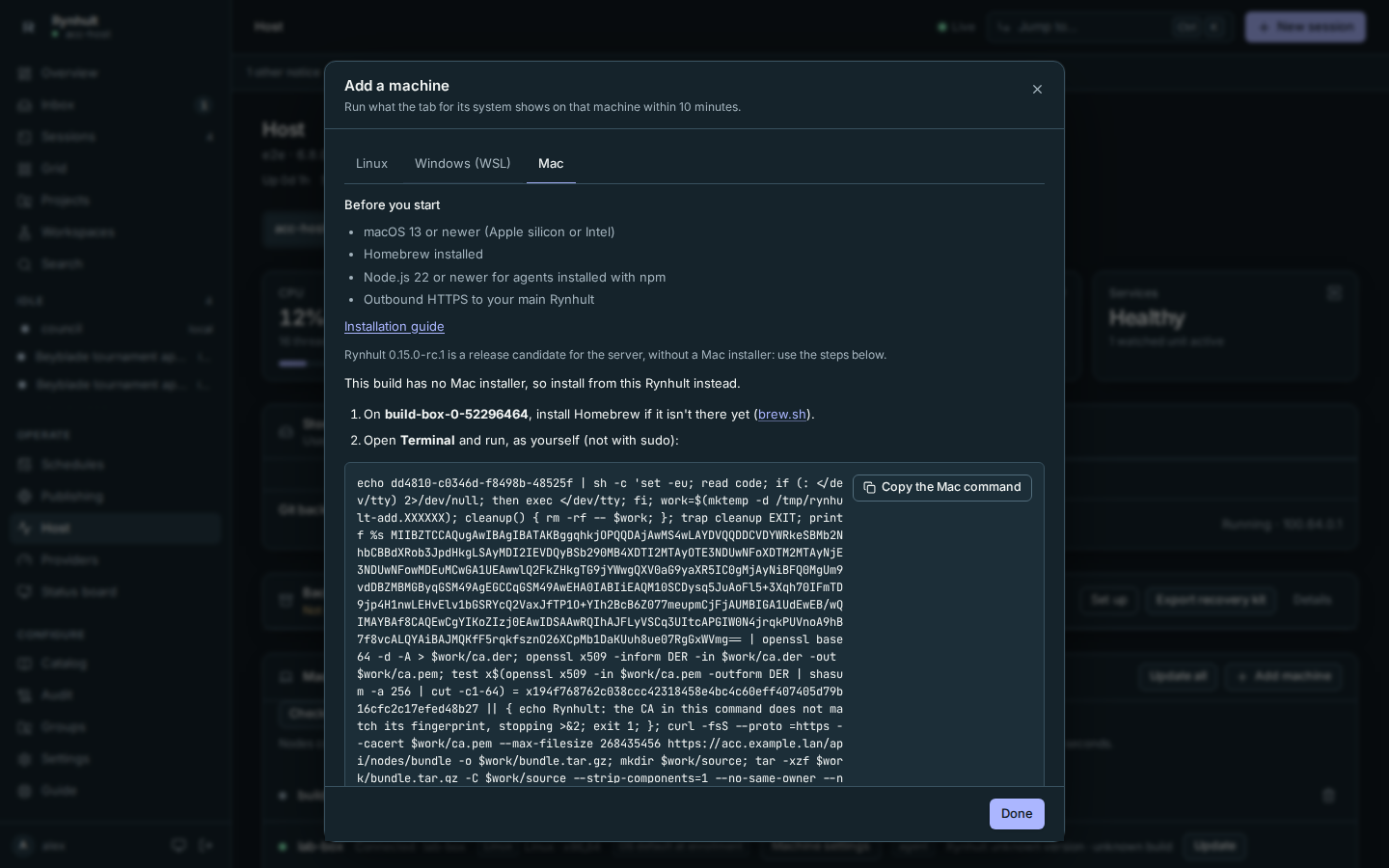
- Install Homebrew if it isn't there yet, and sign in as the user Rynhult should run as (see Before you start).
- On your main Rynhult, open Host → Machines → Add machine, name this Mac (for example
studio-mac), select Create enrollment code, then the Mac tab. - Open Terminal on the Mac, paste the Mac command and press Enter. Run it as yourself: don't add
sudo. It starts withecho <code> | sh -c 'set -eu; read code; …and:- downloads this main Rynhult's source over HTTPS (
/api/nodes/bundle) into a temporary folder it removes afterwards; - with a private certificate (Caddy's own), first checks the root certificate written into the command against its fingerprint, and stops before downloading anything if they differ;
- runs
deploy/node/macos/install.sh, which installs Python, tmux, git and uv with Homebrew if missing, and Rynhult into~/Library/Application Support/ACC(the first time this takes several minutes); - enrolls the Mac with the one-time code, passed to
acc-node enrollthrough a pipe (--code -) so it doesn't show in the process list. The code works once, for 10 minutes.
- downloads this main Rynhult's source over HTTPS (
What you should see: the command ends with Enrolled as studio-mac, and within a minute it shows as connected under Host → Machines. If enrolling fails because the code ran out, select Add machine again and run the new command; installing again is safe. If it says the CA in this command does not match its fingerprint, the command was changed or cut off when copied: copy it again. Nothing was installed.
Rynhult Setup isn't installed this way. To update the Mac later, use its row in Host → Machines (see Update an older machine).
Enroll again, or update
Open Rynhult Setup again. When the Mac is already enrolled it says with which Rynhult, and offers:
- Update only: installs the Rynhult version that's in
/Library/Application Support/ACC/src(install a newer package first). Running sessions keep running. - Set up with a new command from Add machine: enrolls the Mac again, for example after it was removed from Rynhult or to move it to another Rynhult.
From Terminal
Everything Rynhult Setup does is one script, which you can also run yourself, as your user (no sudo):
"/Library/Application Support/ACC/src/deploy/macos/acc-setup.sh" run --dry-run 'rynhult-node enroll --primary https://rynhult.example.com --trust system --code 3fa21c-0b9d4e-77aa01-c3d2e1 --name studio-mac'
--dry-run prints every step and changes nothing; leave it out to set up for real. To install the package from Terminal, replace <version> with the downloaded package version and run:
sudo installer -pkg Rynhult-<version>.pkg -target /
Then run the script above or open Rynhult Setup.
Removing Rynhult from a Mac
- In Rynhult, open Host and select Remove on the machine.
- Wait for sessions and consumers of new command names to finish. On the Mac,
in Terminal, as the user Rynhult ran as, remove phase B additions before deleting
the app (omit the rollback line on a release predating phase B):
A rollback conflict stops the command block. Resolve it before deleting files; pre-existing aliases are retained for manual review. Your workspaces inlaunchctl bootout gui/$(id -u)/local.acc.node; launchctl bootout gui/$(id -u)/local.acc.brokerbash "$HOME/Library/Application Support/ACC/app/deploy/node/macos/install.sh" --rollback-aliases || exit 1rm ~/Library/LaunchAgents/local.acc.node.plist ~/Library/LaunchAgents/local.acc.broker.plistrm "$(brew --prefix)/bin/acc-node" "$(brew --prefix)/bin/acc-wiki-check" "$(brew --prefix)/bin/acc-request" "$(brew --prefix)/bin/acc-env.sh"rm -rf ~/Library/Application\ Support/ACC ~/Library/Logs/ACCsudo rm -rf "/Library/Application Support/ACC" "/Applications/ACC Setup.app"sudo pkgutil --forget local.acc.pkg~/acc-workspacesstay.
Troubleshooting
Rynhult Setup's log is ~/Library/Logs/ACC/setup.log (Show Log in its error message opens it). Failures include a bounded excerpt and the full log path; enrollment codes are redacted even when a failing command echoes one. Running the command below directly writes ~/Library/Logs/ACC/install-node.log and prints that path on failure. The node's own log is ~/Library/Logs/ACC/node.log.
deploy/node/macos/install.sh
| What you see | What it means and what to do |
|---|---|
| npm isn't installed when installing an agent | Install Node.js 22 or newer using the command under Before you start, then try the agent installation again. |
| Rynhult needs Homebrew | Install Homebrew from brew.sh, then open Rynhult Setup again. |
| That isn't the command from Add machine: … | What you pasted isn't exactly the command Rynhult shows. Copy it again with the copy button next to it in Add machine (Copy the enroll command, or Copy the Mac command before v1.0); don't add sudo or anything else. |
| Enrolling failed: … HTTP 403 or code is invalid | The code is used up or older than 10 minutes. Select Add machine again for a new command and paste that. |
| Enrolling failed: the certificate can't be verified or the fingerprint doesn't match | The Mac reached something other than your Rynhult, or Rynhult's certificate changed. See Nodes. |
| Installing failed: … | Read the end of setup.log. Often a Homebrew install failed (no network, or Homebrew needs the update command below); fix that and open Rynhult Setup again. |
| Rynhult Setup can't find Rynhult | The package's files are missing. Install the package again. |
| The installer says it can't be opened because Apple can't check it | The package isn't signed. See step 2. |
Setup logs are private to your Mac account. Setup refuses linked log files or linked parent folders; inspect and remove an unexpected link before retrying. It preserves ordinary existing logs while replacing their file with private permissions.
If Homebrew needs updating, run:
brew update
This page is generated from docs/wiki/User-Guide/Install-macOS.md; the same page is under Guide inside Rynhult.